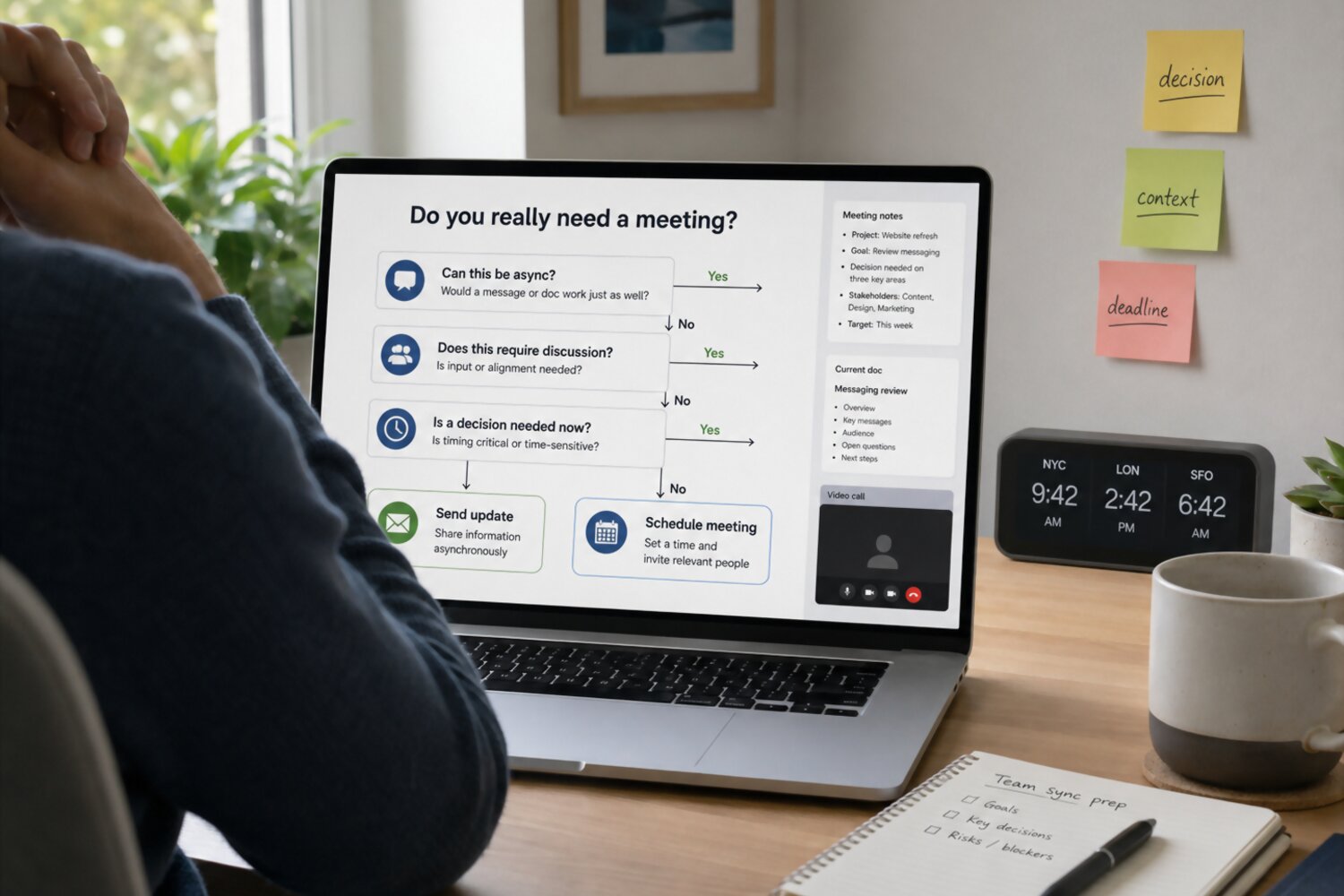
Introduction: Why Remote Teams Need a Better Meeting Filter
Remote work has changed the way teams communicate, but many organizations still rely on meetings as the default answer to almost every question. Need a status update? Schedule a meeting. Want feedback? Add a call. Unsure who owns the next step? Put time on the calendar.
The problem is that remote meetings are not neutral. Every meeting interrupts focused work, asks people to align across schedules and time zones, and often requires follow-up just to clarify what was decided. When meetings are useful, that tradeoff is worth it. When they are not, teams lose time, momentum, and attention without gaining much clarity.
A better approach is not to eliminate meetings altogether. Remote teams still need live conversations for complex decisions, sensitive topics, creative collaboration, and moments when trust or nuance matters. The goal is to become more intentional: use meetings when real-time discussion improves the outcome, and use asynchronous communication when writing, reviewing, or documenting would work better.
In our view, the healthiest remote teams do not treat meetings as proof that work is happening. They treat meetings as one communication tool among many. Before sending a calendar invite, they pause and ask: What are we trying to accomplish, who truly needs to be involved, and could this be handled more clearly another way?
This article offers a practical decision checklist to help you answer those questions. Whether you manage a distributed team, collaborate across departments, or simply want fewer low-value calls on your calendar, the goal is the same: make meetings more purposeful, protect deep work, and help everyone communicate with less friction.
The Core Question: What Outcome Are You Trying to Create?

Before you schedule a meeting, define the outcome you want from it. This sounds simple, but it is where many remote meetings go off track. A vague purpose like “sync up,” “discuss the project,” or “talk through updates” often leads to a vague meeting. People show up without the right context, the conversation wanders, and the team leaves with more questions than decisions.
A better starting point is to ask: What should be different after this conversation? The answer should point to a clear result, not just an activity. For example, “review the campaign” is an activity. “Decide which campaign concept moves into production” is an outcome. “Talk about priorities” is broad. “Agree on the top three priorities for next week” is specific.
For remote teams, this clarity matters even more because live time is expensive in a different way. People may be joining from different time zones, working around deep-focus blocks, or catching up after asynchronous updates. When the desired outcome is clear, participants can prepare better and decide whether they truly need to attend.
Common meeting outcomes include:
- Making a decision when multiple options need live discussion.
- Solving a blocker that requires input from several people.
- Creating alignment around priorities, ownership, or timing.
- Handling a sensitive topic where tone and nuance matter.
- Generating ideas when real-time collaboration will improve the result.
If you cannot name the outcome in one sentence, the meeting may not be ready yet. In that case, start with a written note, project brief, or async question. Give people the context first, then decide whether a live conversation is still necessary. The strongest remote teams do not meet because a topic exists; they meet because a specific outcome requires real-time attention.
When a Meeting Is the Right Choice
Not every meeting is a problem. In fact, some conversations are better live because the team needs immediate exchange, shared attention, or human nuance. The key is to reserve meetings for moments when real-time discussion will produce a better result than a written update or async thread.
A meeting is usually the right choice when the topic involves complexity, urgency, sensitivity, or uncertainty. For example, if a project is blocked and several people need to compare options quickly, a short meeting may save time. If a decision has tradeoffs that are hard to explain in writing, live discussion can help the team test assumptions and reach agreement faster. If the conversation involves tension, feedback, or a sensitive change, seeing and hearing one another can reduce misunderstandings.
Remote teams should be especially thoughtful about using meetings for these situations:
| Situation | Why a meeting helps |
|---|---|
| High-stakes decisions | People can ask questions, challenge assumptions, and align on the final call. |
| Urgent blockers | The team can identify the issue, assign ownership, and agree on next steps quickly. |
| Sensitive conversations | Tone, empathy, and nuance are easier to communicate in real time. |
| Complex problem-solving | Participants can build on each other’s ideas and resolve confusion as it appears. |
| Cross-functional alignment | Teams can clarify dependencies, timing, and responsibilities before work moves forward. |
A useful test is this: Will the meeting change the outcome? If the answer is yes, the meeting may be worth it. If the team only needs to receive information, confirm a simple update, or review something on their own time, async communication is usually better.
When a meeting is the right format, keep it focused. Name the decision or problem in the invite, include any necessary context beforehand, and invite only the people who can contribute to the outcome. A well-chosen meeting should help the team move from uncertainty to clarity—not simply fill space on the calendar.
When Async Communication Is Better

Async communication is often the better choice when people do not need to respond at the same moment. In remote teams, this matters because teammates may be working across different time zones, schedules, focus blocks, or responsibilities. A meeting asks everyone to stop what they are doing at the same time. Async communication gives people room to read, think, respond, and act with more context.
Use async communication when the goal is to share information, gather input, document a decision, or give people time to prepare. For example, a weekly status update usually does not need a live call if each person can post progress, blockers, and next steps in a shared document or project management tool. A simple approval can often happen in a comment thread. A new policy, process change, or project brief may be clearer as a written update that people can revisit later.
Async works especially well for:
- Status updates: Share progress, risks, and next steps without taking time from everyone’s calendar.
- Background information: Provide context in a document before asking for opinions or decisions.
- Simple approvals: Let the right person review and respond without scheduling a call.
- Non-urgent questions: Give teammates time to answer thoughtfully instead of reacting on the spot.
- Documented decisions: Record what was decided, who owns the next step, and where the work stands.
For example, instead of scheduling a 30-minute meeting to “review project status,” a team might post this async update:
“This week, we completed the first design draft, found one blocker with analytics access, and need product feedback by Thursday. Please comment on the open questions in the project doc by 3 p.m. ET tomorrow.”
That message is clear, actionable, and easy to reference. It tells people what changed, what is needed, and by when. If the comments reveal disagreement or confusion, the team can still schedule a short meeting with a focused agenda.
Async communication is not about avoiding conversation. It is about choosing the format that fits the work. When the topic benefits from reflection, documentation, or flexible timing, writing first often leads to a better meeting later—or makes the meeting unnecessary altogether.
The Remote Team Meeting Decision Checklist
Before you send a calendar invite, run the topic through a simple meeting decision checklist. The goal is not to make scheduling harder. It is to make sure every meeting has a clear purpose, the right people, and a real reason to happen live.
Start with the outcome
Ask yourself: What should be decided, solved, clarified, or created by the end of this meeting? If the answer is unclear, pause before scheduling. A meeting without a defined outcome often becomes a general discussion, and general discussions are hard to prepare for or act on.
A strong meeting purpose sounds like:
- “Decide which launch timeline we will use.”
- “Resolve the blocker between design and engineering.”
- “Agree on ownership for the next phase of the project.”
- “Review three options and choose one direction.”
A weak purpose sounds like:
- “Catch up on the project.”
- “Talk about next steps.”
- “Discuss feedback.”
- “Sync on priorities.”
Check whether live discussion is necessary
Next, ask whether the topic truly needs real-time conversation. Some work benefits from immediate back-and-forth, especially when there are tradeoffs, disagreement, urgency, or emotional nuance. Other work is better handled in writing because people need time to review details or respond thoughtfully.
Use these questions as a quick filter:
- Is there a specific decision or problem?
If not, start with an async update. - Could people respond effectively in a document, thread, or project tool?
If yes, write first and meet only if discussion is still needed. - Do the right people need to interact live?
If only one or two people need to weigh in, avoid inviting a larger group. - Is there enough context to make the conversation productive?
If participants need background information, share it before the meeting. - Would delaying the conversation create risk or confusion?
If the issue is urgent or blocking work, a short focused meeting may be appropriate. - Is the timing reasonable for everyone involved?
For distributed teams, consider time zones and avoid making the same people repeatedly absorb inconvenient meeting times. - What happens if this meeting does not happen?
If the work can continue without it, the meeting may not be necessary.
Make the decision visible
Once you decide, communicate the format clearly. If you choose async, tell people where to respond and by when. If you choose a meeting, include the purpose, expected outcome, attendees, and any pre-work in the invite.
The checklist should lead to one of three decisions: meet now, write first, or skip it entirely. That simple habit helps remote teams protect focus time while still making room for the live conversations that actually move work forward.
How to Choose the Best Communication Format
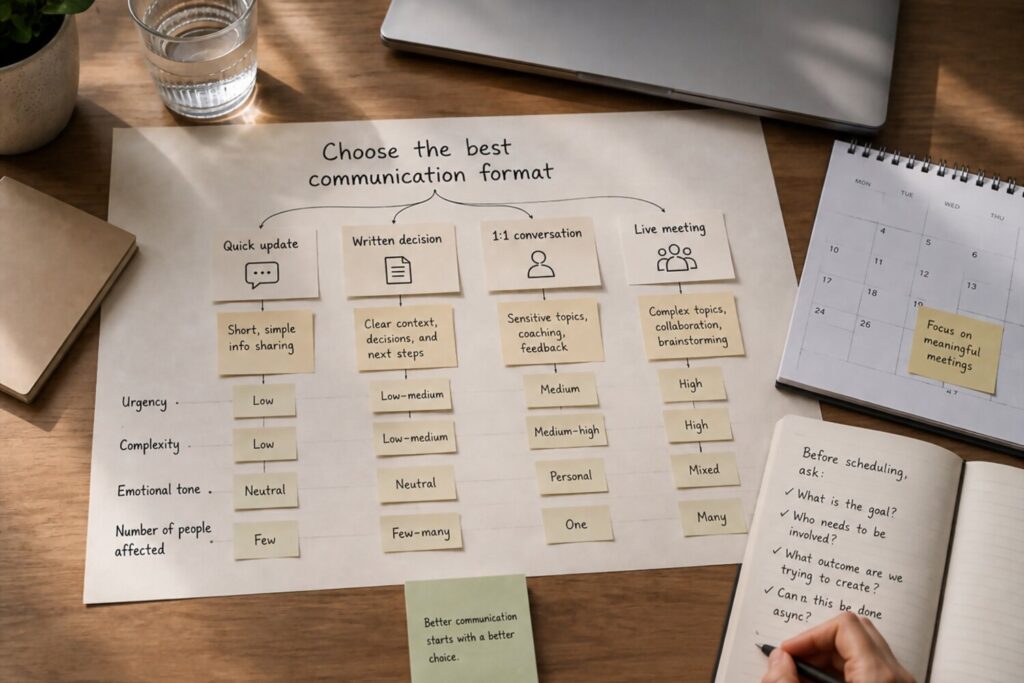
Once you decide a topic does not automatically require a meeting, the next question is: What format will help people understand, respond, and move forward with the least friction? Remote teams have more options than a calendar invite, but those options work best when each one has a clear purpose.
Start by matching the format to the type of work. A quick update does not need the same channel as a complex decision. A sensitive conversation should not be handled the same way as a routine announcement. The right communication format should fit the urgency, complexity, audience, and need for documentation.
Use these guidelines as a practical starting point:
- Use a live meeting when the topic requires real-time discussion, fast decisions, emotional nuance, or collaborative problem-solving.
- Use a shared document when people need context, details, options, or time to review before giving input.
- Use a chat thread for quick questions, small clarifications, or lightweight coordination.
- Use a recorded video or screen walkthrough when visual explanation helps, but a live conversation is not necessary.
- Use email for formal updates, external communication, or messages people may need to reference later.
- Use a project management update when the topic relates to tasks, deadlines, blockers, ownership, or progress tracking.
- Use a decision log when the team needs a durable record of what was decided, why it was chosen, and who is responsible for next steps.
A helpful rule is to ask: Does this topic need conversation, documentation, or visibility? If it needs conversation, a meeting may be appropriate. If it needs documentation, write it down. If it needs visibility, put it where the team already tracks work.
For example, a product manager asking for feedback on a new feature proposal might start with a shared document that explains the problem, options, tradeoffs, and deadline for comments. If the feedback reveals disagreement, the team can schedule a short decision meeting. This keeps the live discussion focused because everyone has already seen the context.
Choosing the right format is not about making communication more complicated. It is about reducing unnecessary interruptions and helping teammates engage in the way the work actually requires. When remote teams are intentional about format, they spend less time re-explaining decisions and more time making progress.
If You Do Need a Meeting, Make It Worth Attending
Once you decide a meeting is necessary, the next responsibility is to make it useful. A meeting should not simply gather people in the same virtual room. It should help the team make progress that would be difficult to achieve through async communication alone.
Start by writing a clear agenda before the invite goes out. The agenda does not need to be long, but it should explain why the meeting exists, what will be covered, and what outcome is expected. If participants need to review a document, compare options, or bring updates, share that information ahead of time. Remote meetings are much stronger when people arrive prepared instead of using the first half of the call to catch up.
A productive remote meeting usually includes:
- A specific purpose: State the decision, problem, or discussion topic clearly.
- The right attendees: Invite people who can contribute, decide, or act on the outcome.
- Pre-work when needed: Share context before the meeting so live time can be used for discussion.
- A facilitator: Assign someone to keep the conversation focused and balanced.
- Time limits: Choose the shortest realistic length and end early when the goal is met.
- Clear next steps: Capture owners, deadlines, and decisions before everyone leaves.
It also helps to separate discussion from decision-making. For example, the first part of the meeting might be used to clarify facts or compare options. The final part should confirm what was decided, what remains unresolved, and who is responsible for follow-up. Without that closing step, a meeting can feel productive in the moment but still leave the team uncertain afterward.
For recurring meetings, review the format regularly. Ask whether the meeting still serves a clear purpose, whether the cadence is right, and whether the same outcome could be achieved with an async update. Some meetings may need to be shorter, less frequent, or replaced entirely.
A good meeting respects people’s time by producing clarity. When the purpose is clear, the right people are present, and the next steps are documented, remote teams can use meetings as focused collaboration tools instead of routine calendar obligations.
Common Remote Meeting Mistakes to Avoid
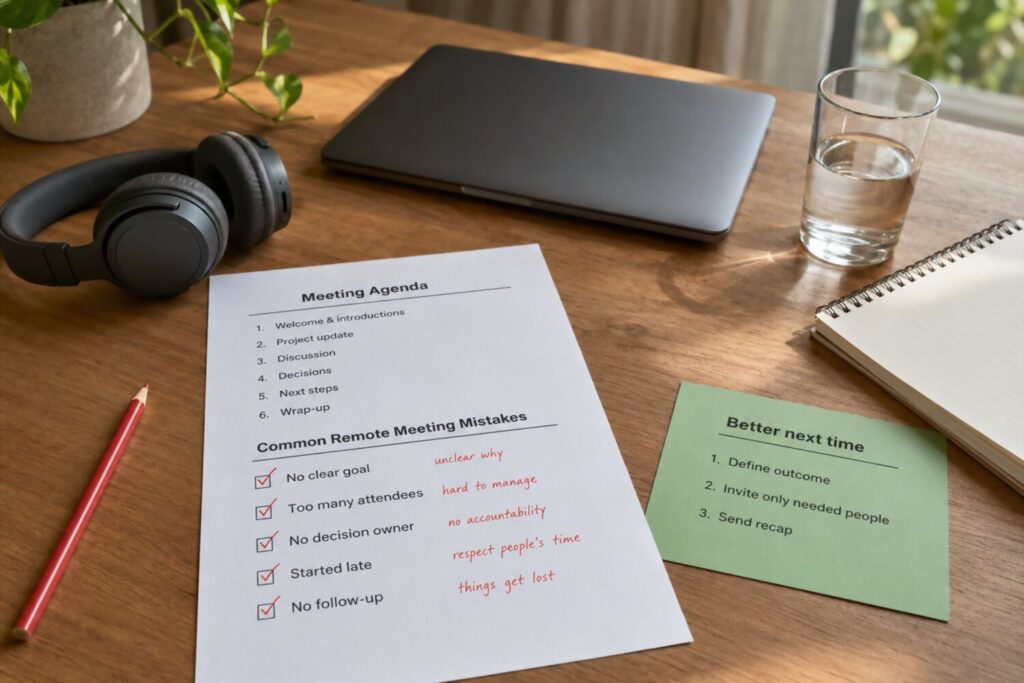
Even well-intentioned remote teams can fall into meeting habits that slow work down. The issue is rarely one single call. It is the pattern: meetings get scheduled before the goal is clear, too many people are invited, and decisions are discussed without being documented. Over time, the team spends more energy coordinating than actually moving work forward.
One common mistake is using meetings as a substitute for unclear communication. If a project brief, task owner, or decision process is vague, scheduling a meeting may feel like the fastest fix. But without better context, the meeting often becomes another place where confusion shows up. A stronger approach is to write down the problem first: what is known, what is uncertain, what decision is needed, and who should be involved.
Remote teams should watch for these recurring meeting problems:
- Scheduling a meeting for every update: Status updates are often better handled in writing, especially when no decision is required.
- Inviting too many people: Large meetings can reduce focus and make it unclear who is responsible for contributing or deciding.
- Skipping the agenda: Without a clear agenda, participants have to guess why they are there and how to prepare.
- Ignoring time zones: A meeting time that is convenient for one group may regularly inconvenience another. Rotate times when needed and avoid making the same people compromise every time.
- Starting without context: If participants need background information, send it ahead of time so the live conversation can focus on judgment, discussion, or decisions.
- Confusing discussion with progress: A meeting can feel active without producing a clear outcome. Always end by confirming decisions, owners, and next steps.
- Letting recurring meetings run on autopilot: A meeting that was useful three months ago may no longer need the same length, cadence, or attendee list.
Another mistake is treating silence as agreement. In remote meetings, some people may need more time to process information, may be dealing with audio delays, or may not want to interrupt. Build in simple participation prompts, such as asking for written comments before the meeting or leaving time for final questions at the end.
The best way to avoid these mistakes is to make meetings easier to challenge. Teams should feel comfortable asking, Do we need this live? What decision are we making? Who truly needs to attend? Those questions are not signs of disengagement. They are signs of a team trying to use its time carefully and communicate with more intention.
Conclusion: A Simple Rule for Better Remote Collaboration
A healthier remote meeting culture starts with one simple rule: meet when live conversation will improve the outcome; write when clarity, flexibility, or documentation matters more. This rule helps teams avoid treating meetings as the default response to every question, update, or uncertainty.
Remote work depends on thoughtful communication. Sometimes that means bringing people together for a focused conversation. Other times, it means giving teammates the space to review information, think carefully, and respond on their own schedule. The goal is not to choose one format forever. The goal is to choose the right format for the work in front of you.
Before scheduling your next meeting, pause and ask:
- What outcome do we need?
- Does this require real-time discussion?
- Who truly needs to be involved?
- Would writing this down make it clearer?
- What decision, owner, or next step should exist afterward?
These questions create a useful habit. They help teams protect focus time, reduce unnecessary coordination, and make the meetings that remain more valuable. A team with fewer meetings is not automatically more productive, but a team with more intentional meetings is usually easier to work with.
The best remote teams do not eliminate meetings. They make meetings earn their place. When a conversation is needed, they prepare well, keep it focused, and document what happens next. When a meeting is not needed, they communicate clearly through async updates, shared documents, or project tools. That balance is what turns remote collaboration from constant coordination into purposeful progress.