
What Makes a React Developer “Senior”?
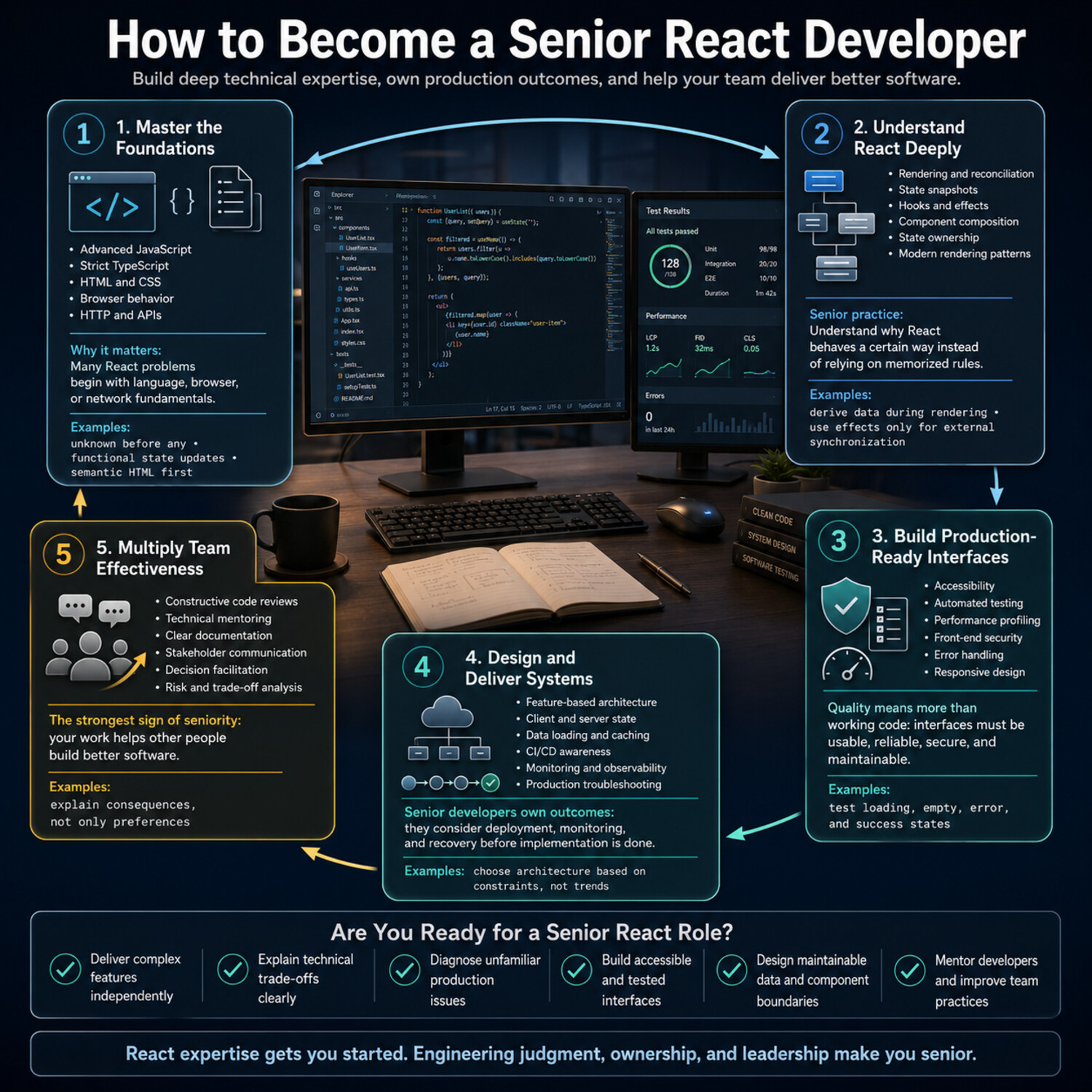
A senior React developer is not simply someone who has used React for a certain number of years. Experience matters, but seniority is better measured by independence, decision-making, technical judgment, and impact on the wider team.
A mid-level developer can usually build features from established requirements and patterns. A senior developer is expected to handle less-defined problems. They clarify requirements, identify risks, evaluate possible solutions, and guide a feature from planning through production support. They also understand that the most technically impressive solution is not always the best one. Maintainability, accessibility, delivery time, team familiarity, and business needs all influence a sound engineering decision.
Senior React developers typically demonstrate strength in several areas:
- Technical depth: They understand React’s rendering behavior, state management, component design, performance, testing, and common failure modes.
- Architectural judgment: They can define appropriate boundaries between components, hooks, services, and application features without introducing unnecessary complexity.
- Ownership: They take responsibility for outcomes rather than stopping when code is merged. This may include monitoring a release, investigating errors, improving documentation, or addressing follow-up issues.
- Communication: They explain technical tradeoffs clearly to engineers, designers, product managers, and other stakeholders.
- Team contribution: They improve code reviews, mentor less-experienced developers, document important decisions, and help the team adopt consistent practices.
For example, imagine a product team needs to add filtering to a large data table. A less-experienced developer may focus immediately on building filter controls. A senior developer first asks practical questions: Should filters be stored in the URL so users can share results? Will filtering happen in the browser or on the server? How will the interface behave with large datasets? What accessibility requirements apply? How should loading, empty, and error states work? The senior-level contribution is not just writing the components—it is recognizing the decisions that determine whether the feature remains reliable and maintainable.
Seniority also does not require becoming a manager. Many senior developers remain individual contributors while leading technical work, supporting teammates, and influencing engineering standards. Leadership in this context means helping a group make better decisions, not controlling every implementation detail.
A useful way to assess your readiness is to review recent projects and ask:
- Can I deliver a complex feature without needing every step defined for me?
- Can I explain why I selected one approach over another?
- Do I consider testing, accessibility, performance, and maintainability during planning?
- Can I identify risks before they become production problems?
- Do my reviews and documentation help other developers work more effectively?
- Can I connect technical decisions to user or business outcomes?
You do not need to answer “yes” to every question before pursuing a senior role. However, repeated gaps reveal where to focus your development. The goal is to move beyond being someone who can build React interfaces and become someone the team can trust to solve important front-end problems responsibly.
Build the JavaScript, TypeScript, and Web Fundamentals Senior Developers Need
React makes it easier to describe user interfaces, but it does not replace the technologies underneath them. Many difficult “React problems” are actually JavaScript, browser, HTML, CSS, or networking problems in disguise. To work effectively at a senior level, you need enough depth in these areas to diagnose behavior instead of relying on trial and error.
Strengthen Your JavaScript Mental Model
Senior React developers should be comfortable reasoning about how JavaScript executes. This includes understanding closures, scope, references, modules, asynchronous operations, and the event loop.
Closures are especially important because React components and hooks rely heavily on them. When a callback reads an outdated state value, for example, the underlying issue may be a stale closure rather than a React bug. Similarly, understanding reference equality helps explain why creating a new object or function can affect dependency checks, memoization, or component rendering.
Focus on concepts that regularly appear in production code:
- Value types compared with reference types
- Closures and lexical scope
- Array methods and immutable updates
- Promises,
async/await, and error handling - The event loop, tasks, and microtasks
- ES modules and dependency boundaries
- Object composition and function design
Do not study these topics only as definitions. Practice predicting what a code sample will do before running it, then verify your reasoning. This develops the debugging skills needed when an application behaves differently from what the code appears to suggest.
Use TypeScript to Model Real Application Behavior
TypeScript is most valuable when it communicates meaningful constraints—not when it simply adds annotations to every variable. A senior developer uses types to make invalid states harder to represent and important assumptions easier to understand.
Suppose a request can be idle, loading, successful, or unsuccessful. Modeling it as several unrelated Boolean values can allow contradictory combinations, such as isLoading and hasError both being true. A discriminated union can describe the valid states more precisely and help the compiler identify incomplete handling.
Develop practical confidence with:
- Union and intersection types
- Type narrowing and type guards
- Generics and reusable constraints
- Utility types such as
Pick,Omit, andPartial - Function overloads when they genuinely improve an API
- Typed component props and event handlers
- API response validation and domain modeling
Avoid using any as a routine escape hatch. When the shape of a value is unknown, unknown is generally safer because it requires validation before use. Type assertions should also be treated carefully: an assertion tells the compiler to trust you, but it does not verify the data at runtime.
Remember that TypeScript types disappear when the application runs. Data from an API, browser storage, form submission, or third-party script may still be malformed. Senior developers understand the boundary between compile-time confidence and runtime validation.
Understand How the Browser Actually Works
React applications run inside a browser, so browser behavior directly affects performance, security, accessibility, and reliability. You do not need to memorize every web standard, but you should understand the systems your code depends on.
Important areas include:
- How the browser parses HTML and CSS
- The relationship between layout, paint, and compositing
- Event propagation, delegation, and default browser behavior
- HTTP requests, headers, caching, and status codes
- Cookies, browser storage, and session persistence
- URL structure, query parameters, and navigation history
- The cost of downloading, parsing, and executing JavaScript
This knowledge improves everyday decisions. For example, saving large amounts of application data to local storage may appear convenient, but storage is synchronous and does not provide the same guarantees as a server-side data source. Likewise, a slow interface may result from expensive layout work or a large script bundle rather than excessive React renders.
Browser developer tools are essential here. Learn to use the Network panel to inspect requests, the Performance panel to investigate slow interactions, and the Elements panel to review computed styles and accessibility information. These tools provide evidence, which is more reliable than guessing where a problem originates.
Treat HTML, CSS, and Accessibility as Engineering Skills
A senior React developer should be able to build a usable interface without depending on a component library to solve every layout or interaction problem.
Semantic HTML provides built-in behavior that is difficult to reproduce correctly with generic elements. A native <button>, for instance, supports keyboard interaction and appropriate accessibility semantics by default. A clickable <div> requires additional code and is easier to implement incorrectly.
Build strong working knowledge of:
- Semantic page structure and form controls
- Accessible names, labels, focus, and keyboard navigation
- Flexbox, Grid, positioning, and stacking contexts
- Responsive layouts and content-driven breakpoints
- CSS specificity, inheritance, and the cascade
- Reduced-motion preferences and visible focus states
Accessibility should be considered during design and implementation, not added as a final checklist item. Test important workflows with a keyboard, verify that form errors are clearly associated with their fields, and use automated tools as support rather than as a substitute for manual review.
Turn Fundamentals Into a Deliberate Practice Plan
The fastest way to identify gaps is to observe where you lose confidence during real work. Keep a simple learning log for several weeks. Each time you encounter unexpected behavior, record the underlying concept after you resolve it.
You can organize your practice around four questions:
- Can I explain what the language is doing?
- Can I model the data accurately?
- Can I identify which browser system is involved?
- Can I build the interface with semantic, accessible web standards?
Choose small exercises that isolate these skills. Build a form without a component library, model a complex request state with TypeScript, inspect a page’s network activity, or debug an asynchronous sequence before adding React. This approach reveals whether you understand the platform itself.
React APIs will continue to evolve. Strong JavaScript and web fundamentals provide a more durable foundation because they allow you to evaluate new patterns, understand their tradeoffs, and solve problems that extend beyond a single framework.
Master Modern React’s Rendering and State Model
Knowing React’s APIs is not the same as understanding React. Senior developers need a reliable mental model of how components render, how state is preserved, and how data moves through an application. That understanding makes it easier to prevent subtle bugs, review code effectively, and choose solutions that remain clear as a product grows.
Understand Rendering Before Optimizing It
A React component is a function that describes what the interface should look like for its current props and state. When relevant state changes, React calls the component again to calculate the next version of the UI. A re-render does not automatically mean that the browser rebuilds the entire page. React compares the results and applies the necessary updates to the DOM.
This distinction matters because developers sometimes treat every re-render as a performance problem. In most applications, ordinary renders are expected and inexpensive. Optimization should begin only after measurement identifies a meaningful issue.
A stronger approach is to ask:
- What state or prop change caused this render?
- Is the component performing expensive work during rendering?
- Is state stored higher in the tree than necessary?
- Is a changing object or function reference affecting child components?
- Does the user experience show an actual delay?
React’s development tools and browser performance tools can help answer these questions. Senior developers use them to collect evidence rather than adding memoization by default.
Learn How React Preserves and Resets State
React associates component state with a component’s position in the rendered tree. When the same component remains in the same position, React generally preserves its state. When the component is removed, replaced with another type, or assigned a different key, its state may reset.
This behavior explains many issues that initially seem unpredictable. For example, a form may retain values when switching between two records because React still sees the same form component in the same location. Giving each record an appropriate key can tell React that it represents a different instance whose state should be initialized separately.
Keys are not merely a way to silence warnings in lists. They help React identify which items correspond across renders. Use stable identifiers from the underlying data when possible. Array indexes can create confusing behavior when items are inserted, removed, or reordered.
Put Each Kind of State in the Right Place
One of the most important senior-level decisions is determining where state should live. Storing everything in a global state system creates unnecessary coupling, while keeping shared information too low in the component tree can lead to duplication and synchronization problems.
It helps to distinguish among several categories:
- Local UI state: Information used by one component or a small subtree, such as whether a menu is open.
- Shared client state: Information that multiple related components need, such as the current step in a workflow.
- Server state: Data retrieved from an external service, including its loading, error, caching, and freshness status.
- URL state: Search terms, filters, selected tabs, or pagination values that should survive navigation or be shareable.
- Persistent browser state: Carefully selected preferences or draft data stored across sessions.
Keep state as close as practical to the components that use it. Lift it upward when multiple components need a single source of truth. Use context for values that genuinely belong to a broad subtree, but avoid turning context into an automatic replacement for explicit props or purpose-built state management.
Before adding state, check whether the value can be calculated from existing props or state. For example, if a list and a search query are already available, the filtered list is usually derived data rather than a separate state value. Storing both the source data and the filtered result introduces another value that must remain synchronized.
Treat Effects as Synchronization Tools
Effects are useful when a component must synchronize with something outside React, such as a browser API, subscription, network connection, analytics service, or third-party library. They are not intended to be the default place for ordinary data transformations or event-driven logic.
Common warning signs include:
- Using an Effect to calculate a value that could be derived during rendering
- Using an Effect to respond to a button click instead of handling the action in the event handler
- Copying props into state without a clear reason
- Creating chains of Effects that repeatedly update one another
- Ignoring dependencies to prevent an Effect from running
An Effect should have a clear external purpose. Ask, What system outside React is this component synchronizing with? If there is no convincing answer, the logic may belong in rendering, an event handler, or a reusable function instead.
Cleanup is also essential. Subscriptions, timers, observers, and event listeners should be released when they are no longer needed. Network requests may require cancellation or protection against outdated responses. Correct cleanup prevents memory leaks and reduces the chance that an old operation will update the interface after the user has moved on.
Design Hooks Around Behavior, Not Convenience
Custom hooks can make complex behavior easier to reuse and test, but extracting code into a hook does not automatically improve its design. A good hook represents a coherent capability, such as tracking an online status, managing a form workflow, or subscribing to a data source.
The hook’s interface should hide implementation details while exposing the information and actions a component needs. Avoid hooks that return a large collection of unrelated values or accept numerous Boolean options that significantly change their behavior. Those patterns often indicate that the abstraction has too many responsibilities.
Hooks must also follow React’s ordering rules: call them at the top level of components or other hooks, not inside conditions, loops, or nested functions. Consistent ordering allows React to associate each hook call with the correct state across renders.
Choose Composition Over Excessive Configuration
Reusable React code is often built more effectively through composition than through highly configurable components. A component with dozens of props may support many situations, but it can become difficult to understand and easy to misuse.
Prefer smaller pieces with clear responsibilities. For example, instead of creating one modal component that handles every possible header, action, form, and layout variation through configuration, provide well-defined structural components and allow callers to compose the content they need.
The goal is not maximum reuse. The goal is an API that makes common behavior easy and incorrect behavior difficult. Some duplication is less harmful than a premature abstraction that couples unrelated features.
Practice Explaining React Behavior
A useful test of React mastery is whether you can explain an issue before changing the code. When debugging, describe the sequence clearly:
- Which component rendered?
- Which props and state values did it read?
- What triggered the update?
- Which identities or keys changed?
- Did an Effect synchronize with an external system?
- Was the unexpected value stored, derived, or captured by a closure?
This habit turns debugging from experimentation into structured reasoning. It also improves code reviews because you can explain not only that a pattern is risky, but how it may fail.
Senior React development depends less on memorizing additional hooks and more on understanding the principles behind them. When rendering, state ownership, identity, Effects, and composition are clear, unfamiliar APIs become easier to evaluate—and complex interfaces become easier to maintain.
Design React Applications That Can Scale
A React application does not become scalable simply because it uses a particular folder structure, state library, or framework. Scalability means the codebase can support new features, more contributors, and changing requirements without making every update slower or riskier.
Senior developers approach architecture as a series of practical tradeoffs. They create enough structure to keep responsibilities clear, but they avoid adding layers, abstractions, or dependencies before the application needs them. The goal is not to predict every future requirement. It is to make the current system understandable and reasonably adaptable.
Organize Code Around Product Features
Small applications often begin with folders such as components, hooks, services, and utils. This can work at first, but it becomes less convenient when one feature is spread across many unrelated directories.
As the application grows, organizing code around features or business domains can make ownership clearer. A feature folder might contain its components, hooks, types, tests, and data-access code in one place. Shared code should be extracted only when multiple features genuinely depend on it.
For example, an account settings feature could contain:
- Page and form components
- Validation rules
- API functions
- Feature-specific hooks
- Type definitions
- Tests
- Formatting or transformation utilities
This approach helps developers understand what belongs to the feature and what changes together. It also reduces the temptation to place every function in a global utils directory or every component in a large shared library.
Feature-based organization should not become a rigid rule. Some concerns, such as authentication, analytics, routing, and design-system components, naturally cross feature boundaries. The important question is whether a developer can locate the code, understand its purpose, and change it without discovering hidden dependencies across the application.
Create Boundaries With Clear Responsibilities
A maintainable React application separates concerns without separating code merely for appearance. Each component, hook, or module should have a responsibility that can be explained clearly.
A useful distinction is:
- Presentation components focus on layout, interaction, and accessible markup.
- Feature components coordinate user workflows and feature behavior.
- Data-access modules communicate with APIs or other external services.
- Domain logic handles rules and transformations that do not depend on rendering.
- Shared infrastructure provides capabilities used across multiple features.
These categories do not require a separate architectural layer in every project. They are a way to recognize when a component is doing too much.
Consider a checkout page that fetches a cart, calculates totals, applies discount rules, manages form state, tracks analytics, and renders the entire interface. Even if the file still “works,” it has become difficult to test and change. A better design moves stable business rules into plain functions, isolates external communication, and divides the interface along meaningful workflow boundaries.
Avoid splitting components solely to reduce line count. A long component with one coherent responsibility may be easier to understand than several small components connected through complicated props and callbacks. Extract code when doing so creates a clearer boundary, supports reuse, or makes behavior easier to test.
Match State Management to the Problem
State libraries can be useful, but they should solve a defined problem. Introducing global state because an application is “getting large” often creates a second architecture that the team must learn and maintain.
Before selecting a state-management approach, identify the type of state involved:
- Can the value remain local to one component?
- Does it need to be shared by nearby components?
- Is it server data that requires caching and revalidation?
- Does it belong in the URL?
- Must it persist across sessions?
- How frequently does it change?
- Which parts of the application need to respond when it changes?
Server data deserves special treatment because it has concepts that ordinary client state does not: freshness, caching, invalidation, request deduplication, retries, and background updates. A data-fetching or server-state library may manage these concerns more effectively than copying API responses into a general-purpose global store.
When global client state is necessary, design it around clear domains rather than creating one large store for the entire application. Keep update logic predictable, expose focused selectors, and avoid allowing any component to modify unrelated parts of the state.
Design Data Fetching as a User Experience
Data fetching is not just a technical operation. It directly shapes what users see while an application loads, fails, refreshes, or displays outdated information.
For each request, define:
- What appears during the initial load?
- Can existing data remain visible during a refresh?
- What should happen after an error?
- Can the operation be retried safely?
- When is cached data considered outdated?
- Which actions should invalidate or update the cache?
- Could two responses arrive out of order?
- Should an optimistic update be used?
Optimistic updates can make an interface feel responsive by showing the expected result before the server confirms it. However, they require a rollback strategy when the operation fails. They are most appropriate when the expected result is predictable and the application can recover clearly from rejection.
Be careful with loading indicators. Replacing an entire page with a spinner during every background request may cause unnecessary disruption. In many cases, retaining existing content and showing a smaller refresh indicator creates a better experience.
Treat Forms as State Machines, Not Collections of Inputs
Forms frequently become one of the most complex areas of a React application. A production form may include validation, conditional fields, asynchronous checks, autosaving, server errors, and multiple submission states.
Model these states explicitly. A form might be editing, validating, submitting, successful, or unsuccessful. Clear state transitions help prevent duplicate submissions, lost input, and contradictory UI messages.
Validation should happen at appropriate boundaries. Client-side validation provides fast feedback, but it should not be treated as proof that submitted data is valid. Server responses must still be handled carefully and presented in a way that helps the user correct the problem.
For reusable form components, prioritize accessible behavior. Labels, instructions, errors, required states, and focus management should remain correct regardless of visual styling. A design-system input that looks consistent but produces inaccessible markup spreads the same problem throughout the application.
Build Shared Components Conservatively
A design system or shared component library can improve consistency, but premature abstraction often produces components with too many options and unclear behavior.
A component is a strong candidate for shared use when:
- It appears in multiple independent features.
- Its interaction and accessibility requirements are stable.
- Its API can be described without referencing one specific workflow.
- Centralizing it reduces meaningful duplication.
- A team or owner can maintain it over time.
Start with low-level building blocks such as buttons, form controls, dialogs, layout primitives, and typography. Keep business-specific behavior inside feature code. A shared DatePicker may be appropriate; a shared CustomerRenewalEligibilityDatePicker probably belongs to its domain.
Document shared components with examples, supported states, accessibility expectations, and known limitations. A reusable component without clear usage guidance can create more inconsistency, not less.
Make Authentication and Permissions Explicit
Authentication determines who the user is. Authorization determines what that user is allowed to do. React may use this information to adjust navigation, hide unavailable controls, or prevent users from entering invalid workflows.
However, hiding a button in the interface is not a security boundary. Permission checks that protect data or actions must also be enforced by the system responsible for those resources.
On the client side, centralize permission logic where practical. Scattered checks such as role-name comparisons can become inconsistent and difficult to update. Prefer capability-based questions such as canEditProject or canApproveInvoice, backed by a clear permissions model.
The interface should also handle permission changes and rejected actions gracefully. A user’s access may change while a page is open, or the client may have outdated information. Treat authorization failures as expected states rather than impossible errors.
Document Important Architectural Decisions
Architecture is easier to maintain when the reasoning behind it is visible. Teams often remember what was implemented but forget why one approach was selected over another.
For decisions with lasting impact, record:
- The problem and relevant constraints
- The options considered
- The chosen approach
- The tradeoffs and known risks
- The conditions that would justify revisiting the decision
This does not require a long formal document for every change. A concise architectural decision record, pull-request explanation, or design note may be sufficient.
Good documentation reduces repeated debate and helps new contributors understand the system without relying entirely on verbal history. It also makes it easier to reverse a decision responsibly when requirements change.
Evolve the Architecture Incrementally
Large rewrites are rarely the only way to improve a React codebase. Senior developers often create progress through small, controlled changes:
- Move business logic out of a difficult component.
- Establish a feature boundary around frequently changed code.
- Replace duplicated request handling with a consistent data layer.
- Introduce a shared component after its usage patterns are understood.
- Add tests around existing behavior before restructuring it.
- Deprecate an old pattern gradually rather than changing the entire application at once.
A scalable architecture is not one that never changes. It is one that can change deliberately. The strongest design decisions make responsibilities visible, limit unnecessary coupling, and allow the team to improve the system without placing normal product development on hold.
Understand Performance, Rendering Strategies, and React Frameworks
Performance work in React should begin with a user-visible problem, not with a collection of optimization techniques. A component that renders frequently is not necessarily slow, and a large codebase is not automatically poorly optimized. Senior developers measure what users experience, identify the actual bottleneck, and then choose the smallest change that produces a meaningful improvement.
Measure Before You Optimize
Performance problems can originate in several parts of the system. A slow interaction may be caused by React rendering, but it could also come from a large network response, expensive JavaScript, repeated layout calculations, oversized images, or a third-party script.
Start by defining the problem precisely. Instead of saying, “The page feels slow,” identify the affected workflow:
- Does the initial page load take too long?
- Is typing delayed in a large form?
- Does opening a panel freeze the interface?
- Does navigation download more JavaScript than necessary?
- Does a data update cause a large section of the page to refresh?
- Is the application slow only on lower-powered devices or slower networks?
Use browser performance tools, network inspection, React profiling tools, and production monitoring data to investigate. Test with realistic datasets and device conditions. A table that performs well with 20 rows may behave very differently with 20,000.
The purpose of measurement is not simply to generate a score. It is to determine where time is being spent and which improvement will matter to users.
Optimize Rendering With Evidence
React re-renders components when their state changes, when their parent renders, or when the values they consume from context change. This behavior is normal. The goal is not to eliminate all renders but to prevent expensive work from happening unnecessarily.
Common rendering problems include:
- Performing heavy calculations directly during every render
- Storing state too high in the component tree
- Updating broad context values frequently
- Rendering very large lists without virtualization
- Recreating expensive resources during rendering
- Using unstable keys that cause components to reset
- Passing rapidly changing values through large subtrees
React provides tools such as memoization for specific performance cases, but these tools have costs. They add comparisons, dependencies, and complexity. A memoized value can also become incorrect when its dependency list is incomplete.
Before adding memoization, consider simpler structural improvements. Move state closer to the component that uses it. Split an expensive section from frequently changing controls. Calculate derived values once at an appropriate boundary. For long lists, render only the visible portion rather than trying to make thousands of mounted elements update faster.
A useful rule is: fix the shape of the work before optimizing individual functions. Better component and state boundaries often produce clearer code and more reliable improvements than widespread manual memoization.
Reduce the Cost of JavaScript
React performance is not limited to rendering speed. Users must download, parse, and execute the application’s JavaScript before many interfaces become interactive. Large bundles can be especially noticeable on slower devices and networks.
Bundle analysis can reveal:
- Large libraries included for a small feature
- Duplicate versions of the same dependency
- Code loaded on routes where it is not needed
- Development-only packages included in production
- Heavy modules imported through a shared entry point
- Features that can be loaded only when the user requests them
Code splitting allows an application to load parts of the codebase separately. Route-level splitting is a practical starting point because users generally do not need every page during the initial visit. Feature-level lazy loading can also help with editors, charts, administrative tools, or other large capabilities that are not immediately visible.
However, splitting code too aggressively can create many small requests and unexpected loading states. Group modules according to how users navigate the product, then test the result rather than assuming that more chunks are always better.
Assets also matter. Images should be appropriately sized and delivered in suitable formats. Fonts, icons, videos, and third-party scripts can affect loading and rendering just as much as application code. Senior developers evaluate the full page, not only the React bundle.
Choose a Rendering Strategy Based on Product Needs
React can be used with several rendering approaches. The right choice depends on the application’s content, interactivity, infrastructure, and update patterns.
Client-side rendering sends a basic document and builds much of the interface in the browser. It can work well for highly interactive applications used after sign-in, but users may need to download and execute substantial JavaScript before seeing or using the page.
Server rendering generates HTML on the server for a request. This can improve how quickly content becomes visible and can support pages that need to be understood by search engines or link-preview services. It also introduces server execution, caching, hydration, and deployment considerations.
Static generation creates pages ahead of requests. It is useful when content changes less frequently and the same result can be served to many users. Teams must decide when pages should be rebuilt and how recently updated content needs to appear.
Many applications use a combination. A marketing page may be generated ahead of time, a product page may be rendered and cached on the server, and an account dashboard may rely heavily on client-side interactions. Senior developers avoid treating one method as universally superior.
When evaluating a rendering strategy, ask:
- Does the page contain public content that should appear quickly?
- How frequently does the content change?
- Is the output personalized for each user?
- How much JavaScript is required for interaction?
- Can the result be cached safely?
- What happens when the server or an upstream service is slow?
- Does the team have the infrastructure knowledge to operate the solution?
These questions connect rendering decisions to product behavior rather than technical fashion.
Understand Hydration and Server-Client Boundaries
When server-rendered HTML becomes interactive in the browser, React must connect that existing markup to client-side component behavior. This process is commonly called hydration.
Problems occur when the server and client produce different initial output. Dates formatted in different time zones, random values, browser-only APIs, and data that changes between server rendering and hydration can cause mismatches. Code that participates in server rendering should produce predictable output and should not assume that browser APIs are available.
Modern React frameworks may also support server-oriented component models. These approaches allow some components to execute on the server and send their results to the client without shipping all of their implementation code to the browser.
The boundary between server and client code requires deliberate design:
- Server-side code can access protected infrastructure and perform data work close to its source.
- Client-side code is needed for browser events, local interactive state, and browser APIs.
- Data passed across the boundary must be serializable in the format supported by the framework.
- Dependencies intended only for the server should not accidentally enter client bundles.
- Security-sensitive values must never be exposed simply because a component uses them.
Server-oriented components do not eliminate the need for APIs, caching decisions, loading states, or client-side interactivity. They change where certain work occurs. Teams should adopt them when the benefits fit the application and the operational model is understood.
Use Suspense and Transitions Purposefully
React includes features for coordinating asynchronous rendering and prioritizing updates. Suspense can define where fallback content appears while supported code or data is unavailable. Transitions can mark some updates as non-urgent so that urgent interactions, such as typing or clicking, remain responsive.
These tools are most effective when the user experience is designed around them. A fallback should preserve context and reduce layout disruption. A transition should not hide an operation whose result the user must confirm immediately.
For example, updating search results can often be treated as less urgent than updating the input field itself. The text box should respond immediately, while the result list may update shortly afterward. In contrast, submitting a payment or saving a critical form needs a clear, immediate status rather than a background transition that makes the action appear uncertain.
Evaluate React Compiler and Automatic Optimizations Carefully
Build-time optimization tools may reduce the need for some manual memoization by analyzing components and preserving values when it is safe to do so. This can simplify performance work, but it does not remove the need for sound architecture.
A compiler cannot compensate for:
- Fetching more data than the interface requires
- Rendering thousands of elements at once
- Placing frequently changing state at the top of the application
- Shipping an unnecessarily large dependency
- Blocking the main thread with expensive calculations
- Using an unsuitable rendering strategy
Automatic optimization should be treated as one part of the toolchain. Teams should verify compatibility, follow supported coding patterns, measure production behavior, and avoid removing established optimizations without testing the effect.
Choose a Framework for Capabilities, Not Popularity
React is a UI library, while frameworks commonly provide routing, data loading, server rendering, build configuration, asset handling, and deployment conventions. A framework can reduce the amount of infrastructure a team must design, but it also introduces its own constraints and upgrade responsibilities.
When comparing options, evaluate:
- Supported rendering and caching models
- Routing and nested layout capabilities
- Data loading and mutation patterns
- Server and client code boundaries
- Deployment requirements
- Testing and observability support
- Upgrade stability and documentation quality
- The team’s existing skills
- Compatibility with current infrastructure
For a small internal tool, a client-rendered application with a straightforward build setup may be sufficient. For a content-heavy public product, server rendering and caching may be more important. For a complex platform, the decision may depend on deployment controls, regional hosting, authentication, or integration with existing services.
A senior React developer should be able to explain not only how a framework works, but why its operating model fits the product.
Treat Performance as an Ongoing Engineering Practice
Performance can regress as features, dependencies, and datasets grow. Establishing repeatable checks is more reliable than conducting occasional optimization projects.
Useful practices include:
- Tracking key user journeys in production
- Reviewing bundle changes during significant releases
- Testing with realistic data volumes
- Setting reasonable performance budgets
- Monitoring slow requests and client-side errors
- Including loading and failure behavior in feature reviews
- Rechecking performance after framework or dependency upgrades
The strongest performance decisions are grounded in evidence. Senior developers identify the user-facing problem, measure its cause, choose an appropriate rendering or architectural solution, and confirm that the change improves the experience without creating unnecessary complexity.
Develop a Production-Grade Quality Strategy
A reliable React application is not created by adding tests at the end of development. Quality comes from a combination of clear requirements, thoughtful implementation, automated checks, accessibility review, secure coding practices, and production monitoring.
Senior developers treat quality as a risk-management process. They identify which failures would matter most to users and the business, then build enough protection around those areas to detect problems early. The goal is not perfect code or maximum test coverage. It is reasonable confidence that the application behaves correctly under realistic conditions.
Build a Balanced Testing Strategy
Different tests answer different questions. A useful test suite combines several levels rather than relying on one type for every problem.
- Unit tests verify focused logic such as calculations, validation rules, reducers, and data transformations.
- Component tests confirm that a component renders and responds correctly to user interaction.
- Integration tests verify that several parts work together, such as a form, validation logic, and an API request.
- End-to-end tests exercise complete workflows in an environment that resembles the deployed application.
A unit test may confirm that a discount function handles boundary values correctly. A component test may verify that an error message appears after invalid input. An end-to-end test may check that a user can complete the entire checkout process.
Each level has tradeoffs. Small tests are usually fast and easy to diagnose, but they cannot prove that an entire workflow works. End-to-end tests provide broader confidence, but they are slower and can require more maintenance. A strong strategy places most detailed checks close to the logic and reserves end-to-end coverage for high-value user journeys.
Examples of workflows that often deserve broader testing include:
- Signing in and signing out
- Creating or editing important records
- Completing a purchase or subscription flow
- Uploading and downloading files
- Recovering from failed requests
- Changing permissions or account settings
- Navigating between critical application states
The exact priorities depend on the product. A reporting dashboard and an online store do not have the same risks, so their test suites should not look identical.
Test Behavior, Not Internal Implementation
Tests are more durable when they interact with the application in ways that resemble real use. Prefer checking visible content, accessible controls, navigation outcomes, and network effects over inspecting private component state or internal function calls.
For example, a form test can:
- Find the email field by its accessible label.
- Enter an invalid value.
- Submit the form.
- Confirm that a useful validation message appears.
- Correct the value and verify the successful outcome.
This test remains valuable even if the form is later refactored from local state to a form library. A test that checks the exact number of state updates or calls a private handler directly may fail even though the user experience remains correct.
Mocking should also be used carefully. Replacing every dependency with a mock can create a test that verifies an imaginary version of the application. Mock external boundaries when necessary, but allow related internal modules to work together when the integration itself is important.
Network-level mocking is often more useful than mocking a data-fetching hook. It allows the component, hook, request logic, and state transitions to operate normally while the test controls the server response.
Test Failure and Recovery Paths
Successful scenarios are only part of production behavior. Requests time out, sessions expire, data becomes outdated, and users submit unexpected input.
Include tests for conditions such as:
- Empty API responses
- Validation errors
- Unauthorized or forbidden requests
- Slow network responses
- Failed file uploads
- Duplicate submissions
- Partial data
- Retry behavior
- Conflicting updates
- Interrupted navigation
Suppose a user submits a form and the server rejects one field. The application should preserve valid input, display the server message near the relevant field, and allow another attempt. Testing this behavior provides more practical confidence than verifying only that the success screen appears.
Loading behavior also deserves attention. Confirm that controls are disabled when duplicate actions would be harmful, but do not disable unrelated parts of the interface unnecessarily. Verify that progress indicators have clear meaning and that users are not left with an indefinite spinner after a request fails.
Include Accessibility in the Definition of Done
Accessibility testing should be part of ordinary development, not a separate activity reserved for specialized audits. Automated tools can identify missing labels, invalid roles, and some contrast or structural issues, but they cannot determine whether an entire workflow is understandable and usable.
Combine automation with manual checks:
- Navigate key workflows using only the keyboard.
- Confirm that focus is visible and moves logically.
- Check that dialogs receive focus when opened and return it when closed.
- Verify that form fields have programmatic labels.
- Associate error messages and instructions with the relevant controls.
- Use semantic elements before adding custom roles.
- Test content at increased zoom and narrow viewport widths.
- Respect reduced-motion preferences where animation is used.
Interactive elements must also communicate their state. An expandable control should expose whether it is open or closed. A selected tab should be identifiable beyond color alone. A loading message should be announced appropriately when the update is important to the user.
Screen-reader testing is valuable for critical workflows, especially when the application includes custom controls, dynamic content, drag-and-drop interactions, or complex data tables. Teams do not need to test every page with every assistive technology, but they should validate the areas where mistakes would create serious barriers.
Handle Errors at the Right Level
React applications need a plan for expected errors and unexpected failures.
Expected errors include invalid input, missing data, rejected requests, and permission failures. These should usually be handled close to the workflow and presented with specific recovery instructions.
Unexpected errors include rendering failures and assumptions that should have been valid but were not. Error boundaries can prevent a failure in one part of the interface from breaking the entire application. They can display fallback content and report the incident for investigation.
An error message should help the user decide what to do next. “Something went wrong” may be appropriate when no safe detail is available, but it should be paired with a recovery path such as retrying, returning to a stable page, or contacting support through an established channel.
Internally, error reports should include useful diagnostic context without exposing sensitive data. Depending on the application, this may include:
- The affected route or feature
- Application and release version
- Browser and device information
- A request or correlation identifier
- The operation that failed
- Relevant feature-flag state
- A sanitized stack trace
Avoid recording passwords, access tokens, payment data, or unnecessary personal information in logs. Logging should be designed intentionally rather than added only after an incident.
Add Observability Beyond Error Tracking
Error monitoring tells you when the application fails visibly, but production quality also includes slow requests, incomplete workflows, and behavior that technically succeeds while frustrating users.
Observability may include:
- Client-side error rates
- API latency and failure rates
- Page and route performance
- Failed or abandoned workflows
- Deployment health
- Feature usage
- Retry frequency
- Unexpected state transitions
Metrics should answer operational questions. For example:
- Did the latest release increase checkout failures?
- Are users in one region seeing slower requests?
- Is a specific browser producing more client errors?
- Did a new feature increase bundle size or interaction delay?
- Are users repeatedly retrying the same action?
Alerts should be actionable. A team that receives frequent low-value notifications may begin ignoring them. Define thresholds around meaningful user impact, provide links to relevant dashboards or runbooks, and review alert quality after incidents.
Apply Front-End Security Fundamentals
A React application cannot enforce all security rules by itself, but front-end code still influences application safety.
Treat external data as untrusted. React escapes ordinary text values when rendering them, but developers must be cautious when inserting raw HTML or using third-party rendering libraries. Content that must be rendered as HTML should be sanitized with an appropriate, maintained solution and handled through a clearly reviewed boundary.
Other important practices include:
- Do not place secrets in client-side code or build-time variables exposed to the browser.
- Enforce authorization on the server, even when the interface hides restricted actions.
- Avoid storing sensitive tokens in insecure locations without understanding the threat model.
- Use secure, well-maintained authentication flows.
- Validate redirect destinations.
- Keep dependencies updated through a controlled review process.
- Remove unused packages and abandoned libraries.
- Review third-party scripts, since they execute within the application’s page context.
Dependency alerts are useful, but updates should not be applied blindly. Review release notes, test important workflows, and understand whether a reported issue affects the way the package is used in the application.
Security-sensitive changes should receive focused review from people familiar with the relevant system. Seniority includes recognizing when additional expertise is needed rather than treating every concern as purely a React problem.
Define Useful Code Review Standards
A strong code review is not a search for personal style preferences. It evaluates correctness, clarity, maintainability, and risk.
Reviewers can ask:
- Does the implementation match the intended user behavior?
- Are loading, empty, error, and permission states handled?
- Is the state stored at an appropriate level?
- Could the change introduce accessibility problems?
- Are API and data assumptions validated?
- Are tests focused on meaningful behavior?
- Does the solution add unnecessary abstraction?
- Is production monitoring needed?
- Can the change be rolled back safely?
- Does the pull request explain important tradeoffs?
Comments should be specific and proportional to the issue. Distinguish required corrections from optional suggestions. Explaining why a change matters makes the review more educational and reduces repeated discussions.
Large pull requests are difficult to review effectively. When possible, divide work into coherent stages, such as preparatory refactoring, shared infrastructure, feature implementation, and cleanup. Smaller changes make risk easier to assess and production problems easier to isolate.
Create a Practical Definition of Done
A shared definition of done prevents quality requirements from depending on who happens to implement or review a feature.
For a typical React feature, completion may mean:
- Acceptance criteria are satisfied.
- Important edge cases are handled.
- Automated tests cover appropriate behavior.
- Keyboard and accessibility checks are complete.
- Loading, empty, and error states are implemented.
- Analytics or monitoring is added where necessary.
- Documentation is updated.
- The production build succeeds.
- The feature can be released or rolled back safely.
- Follow-up work is recorded rather than left implicit.
Not every change needs every item. A copy adjustment requires less validation than a new authentication workflow. The checklist should guide judgment, not replace it.
Use Coverage as a Signal, Not a Target
Code coverage can identify files or branches that tests never execute, but a high percentage does not prove that the tests are useful. A test may run every line while making weak assertions. Another test may cover only a small portion of code but protect a critical user outcome.
Use coverage reports to ask better questions:
- Why is this important branch untested?
- Are failure paths covered?
- Does the test verify an outcome or merely execute code?
- Is frequently changed code protected?
- Are complex business rules tested at their boundaries?
Avoid writing low-value tests solely to increase a number. Confidence should come from the relationship between product risk and the behaviors the test suite protects.
Improve Quality Through Production Feedback
No pre-release process can reproduce every browser, dataset, network condition, and user behavior. Production feedback is therefore part of the quality strategy.
After releasing an important feature:
- Confirm that the deployment completed successfully.
- Review errors, latency, and key workflow metrics.
- Verify the feature manually in the production environment when appropriate.
- Compare behavior with the expected baseline.
- Investigate unexpected changes before they become larger incidents.
- Record lessons that should influence future implementation or testing.
When a defect reaches production, avoid treating the fix as the entire response. Ask why the problem was not detected earlier. The answer may point to missing requirements, an untested boundary, incomplete monitoring, unclear ownership, or an unsafe release process.
A production-grade quality strategy connects development, testing, accessibility, security, review, deployment, and monitoring. Senior React developers help teams build this system of safeguards so that quality does not depend on one careful person remembering every possible failure.
Learn the Delivery and System Design Skills Beyond React
Senior React developers do more than build components. They understand how the front end communicates with services, moves through delivery pipelines, behaves in production, and fits into a larger technical system.
You do not need to become a backend, infrastructure, or security specialist. However, you should understand enough of the surrounding system to make informed decisions, investigate failures, and collaborate effectively with other engineering teams.
Understand the API Contract, Not Just the Endpoint
A front end depends on more than a URL and a successful response. It relies on an API contract: the expected request format, response structure, authentication rules, error behavior, and compatibility guarantees.
Whether an application uses REST, GraphQL, or another approach, a senior developer should be able to answer questions such as:
- Which fields are required, optional, or nullable?
- How are validation errors represented?
- How does pagination work?
- Can requests be retried safely?
- What happens when data changes between requests?
- How are API versions or breaking changes handled?
- Which operations require authentication or specific permissions?
- How should the client respond to rate limits or temporary failures?
For example, a 200 OK response does not necessarily mean the data is usable. The response may contain missing fields, an unexpected enum value, or a partial result. TypeScript can describe the expected shape, but external data still requires runtime handling at the application boundary.
Keep transport details separate from UI components where practical. A component should not need to understand every header, response code, and serialization rule. A dedicated data-access layer can translate external responses into application-friendly models and produce consistent errors.
Know the Difference Between Authentication and Authorization
Authentication establishes a user’s identity. Authorization determines what that user is permitted to do. React applications often reflect both concepts, but they should not be treated as interchangeable.
The client may use authentication state to display an account menu or redirect an unauthenticated user. It may use permission data to hide or disable actions the user cannot perform. However, these interface checks are primarily for user experience. The service responsible for the data or action must enforce the actual permission rules.
Senior developers also plan for authentication-related edge cases:
- A session expires while the application is open.
- A token refresh fails.
- The user signs out in another browser tab.
- An API request returns an authorization error after the UI allowed the action.
- The user’s permissions change during an active session.
- A redirect attempts to send the user to an unsafe or unsupported destination.
These situations should lead to predictable behavior. Preserve unsaved work when possible, explain why an action cannot continue, and avoid redirect loops or repeated failed requests.
Design for Network Reality
Local development environments are usually fast and stable. Production networks are not. Requests may be delayed, repeated, interrupted, returned out of order, or completed after the user has left the page.
A robust interface accounts for:
- Timeouts and temporary failures
- Duplicate submissions
- Slow responses
- Offline or unstable connectivity
- Request cancellation
- Stale cached data
- Concurrent updates
- Rate limiting
- Partial success
Consider an “Approve” button for a business workflow. If the user clicks it twice because the first request appears unresponsive, the system should not accidentally perform the action twice. The UI can disable repeated submission while the request is pending, but the backend may also need an idempotency mechanism. Recognizing that both layers contribute to reliability is an important system-design skill.
Senior developers also avoid retrying every failed request automatically. A read request may be safe to retry. A mutation that creates a payment, order, or record may require stronger guarantees. Retry behavior should reflect the operation rather than being applied as a universal rule.
Understand the Delivery Pipeline
A feature is not complete when it works on a developer’s machine. It must pass through build, test, deployment, configuration, and monitoring systems before users can rely on it.
A typical continuous integration and delivery pipeline may include:
- Installing dependencies from a locked version set
- Running formatting and linting checks
- Performing TypeScript compilation
- Running automated tests
- Building production assets
- Scanning dependencies or artifacts
- Deploying to a preview or staging environment
- Running smoke or end-to-end tests
- Releasing to production
- Verifying deployment health
Senior developers should understand what each stage protects against and what happens when it fails. A green pipeline provides useful confidence only when its checks reflect meaningful risks.
Build environments also need consistent configuration. Environment variables may supply public service URLs or feature settings, but browser-delivered code cannot safely contain private credentials. Anything included in a client bundle should be considered accessible to users.
When diagnosing a deployment issue, compare the local and production environments carefully. Differences may include Node.js versions, environment configuration, caching, routing rules, content security policies, API domains, or build-time transformations.
Use Feature Flags and Gradual Releases Carefully
Feature flags allow teams to separate deployment from release. Code can reach production while remaining unavailable to most users, then be enabled gradually after verification.
Flags can support:
- Internal testing
- Limited user groups
- Gradual percentage-based rollout
- Regional release
- Comparison experiments
- Emergency deactivation
- Migration between old and new implementations
They are useful, but they add states that must be tested. A feature may behave differently when enabled, disabled, or combined with another flag. The application should also handle a flag service that is slow or unavailable.
Flags should have an owner and a removal plan. Permanent, undocumented flags create dead code and make behavior difficult to reason about. Once a rollout is complete and the fallback is no longer needed, remove the flag and obsolete path through a normal reviewed change.
Plan Releases With Rollback in Mind
A senior developer asks how a change can be reversed before it reaches production. Rollback may involve redeploying a previous build, disabling a feature flag, reverting a configuration change, or restoring compatibility with an earlier API version.
Front-end rollback is not always as simple as serving an older JavaScript bundle. A new release may depend on a database migration, updated API response, or changed browser storage format. If the backend and frontend are deployed independently, their versions may briefly differ.
Design API and data changes to tolerate this overlap. For example, adding a new optional field is usually easier to roll out safely than immediately changing the meaning of an existing field. During migrations, the client may need to support both old and new formats temporarily.
Release plans for higher-risk changes should identify:
- The expected behavior
- The signals that indicate success
- The signals that indicate a problem
- Who is responsible for monitoring
- How the change can be disabled or reversed
- Which dependencies must remain compatible
This preparation reduces uncertainty during an incident.
Build Front-End Observability Into the System
When an issue occurs in production, developers need enough evidence to understand what happened. A screenshot and the message “the page is broken” are rarely sufficient.
Useful front-end observability can include:
- JavaScript error reporting
- Failed request tracking
- Route and page-load performance
- Interaction timing
- Release version identification
- Feature-flag state
- Correlation or request identifiers
- Browser and device context
- Structured workflow events
Correlation identifiers are particularly useful in distributed systems. If the front end records the same request identifier as the API gateway and backend service, engineers can trace one failed action across multiple layers.
Observability must also respect data boundaries. Logs and analytics should not capture passwords, authentication tokens, private form values, or unnecessary personal information. Define approved fields and review instrumentation as part of the feature.
Understand Monorepos and Package Boundaries
Larger organizations may keep multiple applications and shared packages in one repository. A monorepo can simplify coordinated changes, dependency management, and shared tooling, but it does not automatically create good architecture.
Clear package boundaries still matter. A package should have a defined purpose, public interface, ownership model, and release expectations. Avoid turning a shared package into a collection of unrelated helpers imported by every application.
Before extracting code into a package, consider:
- Is it used by multiple independent consumers?
- Is its interface stable enough to maintain?
- Can it be tested without depending on one application?
- Who owns changes and reviews?
- Will all consumers need to upgrade together?
- Does sharing reduce duplication or create coupling?
Sometimes copying a small, unstable helper into two features is safer than creating a shared dependency too early. Shared code has a coordination cost that should be justified by its value.
Dependency direction is also important. Foundational UI or utility packages should not import business-specific application code. Enforcing these boundaries with lint rules, build configuration, or workspace tooling can prevent accidental coupling.
Practice Front-End System Design
System-design interviews and real project planning often begin with a broad request, such as “Design a large analytics dashboard” or “Build a real-time collaboration interface.” The goal is not to name as many tools as possible. It is to clarify requirements and make reasoned tradeoffs.
A useful process is:
- Clarify the users and workflows. What are they trying to accomplish?
- Identify scale and constraints. How much data, how many concurrent users, and which devices must be supported?
- Define the major data flows. Where does information originate, and how does it reach the interface?
- Choose state ownership. Which data belongs to the server, URL, local component, or shared client state?
- Plan loading and failure behavior. What happens when one service is slow or unavailable?
- Address performance. Consider bundle size, pagination, virtualization, caching, and update frequency.
- Address accessibility and security. Include keyboard use, permission handling, and protected data.
- Plan delivery and observability. Explain rollout, monitoring, and rollback.
- State tradeoffs. Describe what the design optimizes for and what it deliberately postpones.
For a dashboard with large datasets, for example, you might use server-side filtering and pagination rather than sending every record to the browser. Frequently viewed summaries could be cached, while live metrics could update through polling or a persistent connection. Large tables might use virtualization, and filter state could be stored in the URL so views are shareable.
The value of the exercise lies in connecting technical decisions to requirements—not in producing one universally correct architecture.
Collaborate Across Engineering Disciplines
Many front-end problems cannot be solved well in isolation. A senior React developer works with backend engineers on API contracts, designers on interaction states, platform teams on deployment, security specialists on sensitive workflows, and product managers on scope and risk.
Effective collaboration includes bringing concrete evidence to discussions. Instead of saying, “The API is slow,” provide request timings, affected routes, payload sizes, and examples. Instead of requesting a new endpoint immediately, explain the user workflow and why the current contract creates difficulty.
It also means involving the right people early. A feature that depends on new permissions, real-time infrastructure, analytics, or a major data migration should not reach the final implementation stage before those dependencies are discussed.
Senior developers make these conversations easier by documenting assumptions, identifying unresolved questions, and translating between product behavior and technical constraints.
Think in Systems, Even When Changing One Component
A small front-end change can affect many parts of an application. Adding a field may require updates to validation, API contracts, analytics, permissions, tests, documentation, and stored data. Changing a route may affect bookmarks, redirects, search indexing, or external integrations.
Before implementing a significant change, trace its path through the system:
- Where does the data originate?
- Which services transform it?
- How is it cached?
- Which clients consume it?
- How is access controlled?
- How will the change be deployed?
- How will failures be detected?
- Can older versions continue to operate?
This broader view is one of the clearest differences between implementing a React task and owning a production feature. Senior developers still write components, but they understand that those components are part of a network of services, processes, and user expectations.
Demonstrate Senior-Level Leadership and Business Impact
Senior React developers are evaluated not only by the code they write, but also by how they improve decisions, delivery, and outcomes across the team. Leadership at this level does not require a management title. It means taking responsibility for complex work, helping others succeed, and connecting technical choices to user and business needs.
The strongest senior developers are not the loudest people in the room or the ones who approve every decision. They create clarity, reduce avoidable risk, and help the team move forward with confidence.
Turn Ambiguous Requests Into Clear Plans
Senior-level work often begins with incomplete information. A request such as “Improve the dashboard” or “Make the checkout faster” does not yet define an engineering task.
Before proposing a solution, clarify the problem:
- Which users are affected?
- What behavior is causing difficulty?
- How is the issue currently measured?
- What outcome would count as an improvement?
- Which constraints cannot be changed?
- What dependencies or risks are involved?
- What can be delivered incrementally?
For example, “make the dashboard faster” could refer to initial loading, filter responsiveness, chart rendering, or slow API responses. Each problem requires a different approach. A senior developer avoids committing to a technical solution until the team understands what needs to improve.
Once the problem is clear, break the work into stages. Identify assumptions, decision points, and unknowns. A short technical plan might include the current behavior, proposed approach, expected tradeoffs, test strategy, rollout plan, and success signals.
This planning should be proportional to the change. A small UI adjustment may need only a clear pull-request description. A major data-flow redesign may require a written design review.
Communicate Tradeoffs, Not Just Recommendations
Technical decisions rarely have only one valid answer. A senior developer explains why one option fits the current situation better than the alternatives.
Suppose a team is deciding whether to introduce a global state library. A useful explanation does not stop at “we should use this tool.” It describes:
- The problem the team is trying to solve
- Why current patterns are becoming difficult
- Which alternatives were considered
- The implementation and maintenance costs
- How the decision affects testing and onboarding
- What evidence would justify revisiting it later
This style of communication builds trust because stakeholders can see the reasoning behind the recommendation.
Adapt the level of detail to the audience. Engineers may need to discuss component boundaries, cache invalidation, or deployment risks. Product managers may need to understand delivery options, user impact, and sequencing. Designers may need to review loading behavior, error states, and interaction constraints.
Avoid hiding uncertainty behind technical language. It is reasonable to say, “We have not measured this yet,” or “This approach should reduce bundle size, but we need a prototype to confirm the effect.” Clear uncertainty is more useful than false confidence.
Lead Code Reviews Constructively
Code review is one of the most visible ways senior developers influence engineering quality. A strong review protects the product while helping the author improve.
Focus comments on meaningful concerns:
- Correctness and edge cases
- Accessibility and user experience
- State ownership and data flow
- Error and loading behavior
- Security-sensitive assumptions
- Test quality
- Long-term maintainability
- Unnecessary complexity
- Consistency with established architecture
Separate blocking issues from optional suggestions. A comment such as “This must be changed because it can submit the form twice” carries a different priority from “This variable name could be more descriptive.”
Explain the reason behind requests. Instead of writing, “Do not use an Effect here,” explain that the value can be derived during rendering and that storing it separately creates another state value that may become inconsistent.
Senior reviewers should also recognize good work. Pointing out a clear abstraction, thoughtful test, or careful error state reinforces useful practices and makes reviews feel collaborative rather than purely corrective.
Mentor Without Becoming a Bottleneck
Mentoring is not about giving someone the answer as quickly as possible. It is about helping them build the reasoning skills to solve similar problems independently.
Useful mentoring techniques include:
- Asking what options the developer considered
- Reviewing debugging evidence together
- Explaining the tradeoff behind a pattern
- Pairing on the first example, then letting them complete the next one
- Recommending focused documentation or exercises
- Giving feedback soon enough for it to be applied
- Assigning ownership that stretches skills without removing support
For example, when a developer proposes moving all feature state into context, a mentor might ask which components need the state, how frequently it changes, and what would re-render when the provider updates. These questions teach architectural reasoning rather than simply prescribing a rule.
Avoid taking over every difficult task. If one senior developer becomes the only person who can change the build system, approve architecture, or debug production incidents, the team has created a dependency rather than leadership.
Good mentoring distributes knowledge and decision-making. Documentation, pairing, internal demonstrations, and shared ownership help reduce reliance on any one person.
Manage Technical Debt With Evidence
Technical debt is not simply old code or code someone dislikes. It is a design or implementation choice that creates an ongoing cost, risk, or limitation.
When proposing technical-debt work, describe its impact:
- Does it slow feature delivery?
- Does it cause recurring defects?
- Does it create security or reliability risk?
- Does it make onboarding difficult?
- Does it prevent a required product change?
- How often does the team encounter the problem?
- What is the smallest improvement that would reduce the cost?
“Refactor the settings page because it is messy” is difficult to prioritize. “Extract the validation and request logic because three recent changes introduced regressions in the same workflow” gives the team a clearer basis for deciding.
Not all debt should be removed immediately. Some shortcuts are reasonable when they are understood, documented, and limited. Senior judgment includes knowing when a temporary solution is acceptable and when postponing improvement creates unacceptable risk.
A practical debt proposal should include the problem, expected benefit, scope, risk, and possible incremental steps. This makes the discussion more concrete and reduces the chance that refactoring becomes an open-ended rewrite.
Handle Incidents With Calm and Structure
Production issues test technical judgment and communication. During an incident, the immediate goal is to reduce user impact and restore stable behavior—not to prove who caused the problem.
A useful response sequence is:
- Confirm the symptoms and affected users.
- Identify recent releases or configuration changes.
- Reduce impact through rollback, feature deactivation, or another safe mitigation.
- Gather logs, request data, error reports, and reproduction steps.
- Communicate confirmed facts and current actions.
- Verify recovery through production signals.
- Investigate the root cause after stability is restored.
Avoid making unverified claims during an incident. Distinguish between facts, hypotheses, and next steps. For example: “Errors began after release 2.4.1” is a fact if supported by monitoring. “The new caching logic may be responsible” is a hypothesis that still needs testing.
Afterward, document what happened, why existing safeguards did not catch it, and which changes would reduce recurrence. Focus on system improvements such as better tests, safer rollout, clearer ownership, or stronger monitoring.
A productive review examines the conditions that allowed the failure rather than treating one person’s mistake as the complete explanation.
Measure Outcomes, Not Activity
Lines of code, ticket counts, and pull-request volume provide limited information about senior-level impact. Stronger evidence connects technical work to an observable result.
Examples include:
- Reducing errors in a critical workflow
- Improving page or interaction performance
- Shortening the time needed to release a feature
- Removing a recurring source of production incidents
- Increasing test confidence around a risky area
- Improving accessibility in an important user journey
- Simplifying an architecture so more developers can contribute
- Reducing support requests caused by unclear interface behavior
Not every contribution produces a simple number. Architectural guidance, mentoring, and risk reduction may be demonstrated through examples, before-and-after comparisons, incident history, or team feedback.
When documenting your work, explain the full story:
- What problem existed?
- Why did it matter?
- What constraints shaped the solution?
- What did you personally own?
- Which tradeoffs did you make?
- What changed after the work was delivered?
- What did you learn or adjust afterward?
This format is useful for performance discussions, portfolios, interviews, and project retrospectives because it shows judgment rather than only implementation.
Use AI-Assisted Tools Responsibly
AI-assisted development tools can help draft tests, explain unfamiliar code, suggest refactors, or generate repetitive scaffolding. They can also produce incorrect logic, insecure patterns, outdated APIs, or code that appears plausible without matching the application’s requirements.
Senior developers treat generated code as untrusted input. Review it with the same care applied to code from any other source.
Before accepting generated output:
- Confirm that you understand what the code does.
- Check it against current project conventions.
- Test success, failure, and edge cases.
- Review data handling and security implications.
- Verify library APIs against official documentation.
- Remove unnecessary complexity or invented abstractions.
- Avoid providing sensitive company, user, or credential data to tools that are not approved for it.
AI can accelerate parts of the workflow, but responsibility remains with the developer who introduces the change. A useful tool does not replace architecture, product context, testing, or professional judgment.
Influence Without Controlling Every Decision
Senior developers should raise standards without creating unnecessary gatekeeping. Teams work better when decisions can be made at the appropriate level.
Create clear principles, examples, and guardrails so that developers do not need approval for every implementation detail. Reserve deeper review for changes with broad architectural, security, accessibility, or operational impact.
Healthy influence may include:
- Writing a concise engineering guideline
- Creating an example implementation
- Facilitating a design discussion
- Documenting a decision and its tradeoffs
- Inviting feedback before finalizing a standard
- Revisiting a rule when evidence shows it is no longer useful
Be willing to disagree and still support the final decision. Once the team has considered the relevant information and chosen a reasonable direction, continued resistance can slow delivery without improving the outcome.
Senior leadership includes changing your mind when new evidence appears. Consistency is useful, but defending an outdated decision only because you originally proposed it is not.
Build Trust Through Reliable Ownership
Trust develops when teammates know that you communicate early, follow through on commitments, and respond responsibly when plans change.
Reliable ownership includes:
- Raising risks before deadlines are missed
- Asking for help when expertise is needed
- Keeping stakeholders informed of meaningful changes
- Documenting decisions and unresolved questions
- Following a feature through release and verification
- Acknowledging mistakes without hiding their impact
- Sharing credit for collaborative work
- Leaving systems easier for others to understand
This does not mean accepting unlimited work or solving every problem personally. Sustainable ownership includes setting priorities, clarifying responsibilities, and protecting focus.
The move to senior React developer is ultimately a move from completing assigned implementation tasks to improving how important problems are solved. Technical depth remains essential, but its value grows when it is paired with communication, mentoring, sound judgment, and measurable contribution to users and the organization.
Conclusion
Becoming a senior React developer is less about collecting libraries and more about developing dependable engineering judgment. Strong candidates understand React deeply, but they also know the web platform, design maintainable systems, test critical behavior, investigate production issues, and communicate tradeoffs clearly.
Choose one or two areas from this guide where your experience is weakest, then build those skills through real project ownership. Document your decisions, measure the results, and ask for feedback from experienced teammates. Over time, the clearest evidence of seniority is not a job title—it is your ability to solve complex problems responsibly and help the people around you deliver better software.