
What Is a Middle React Developer?
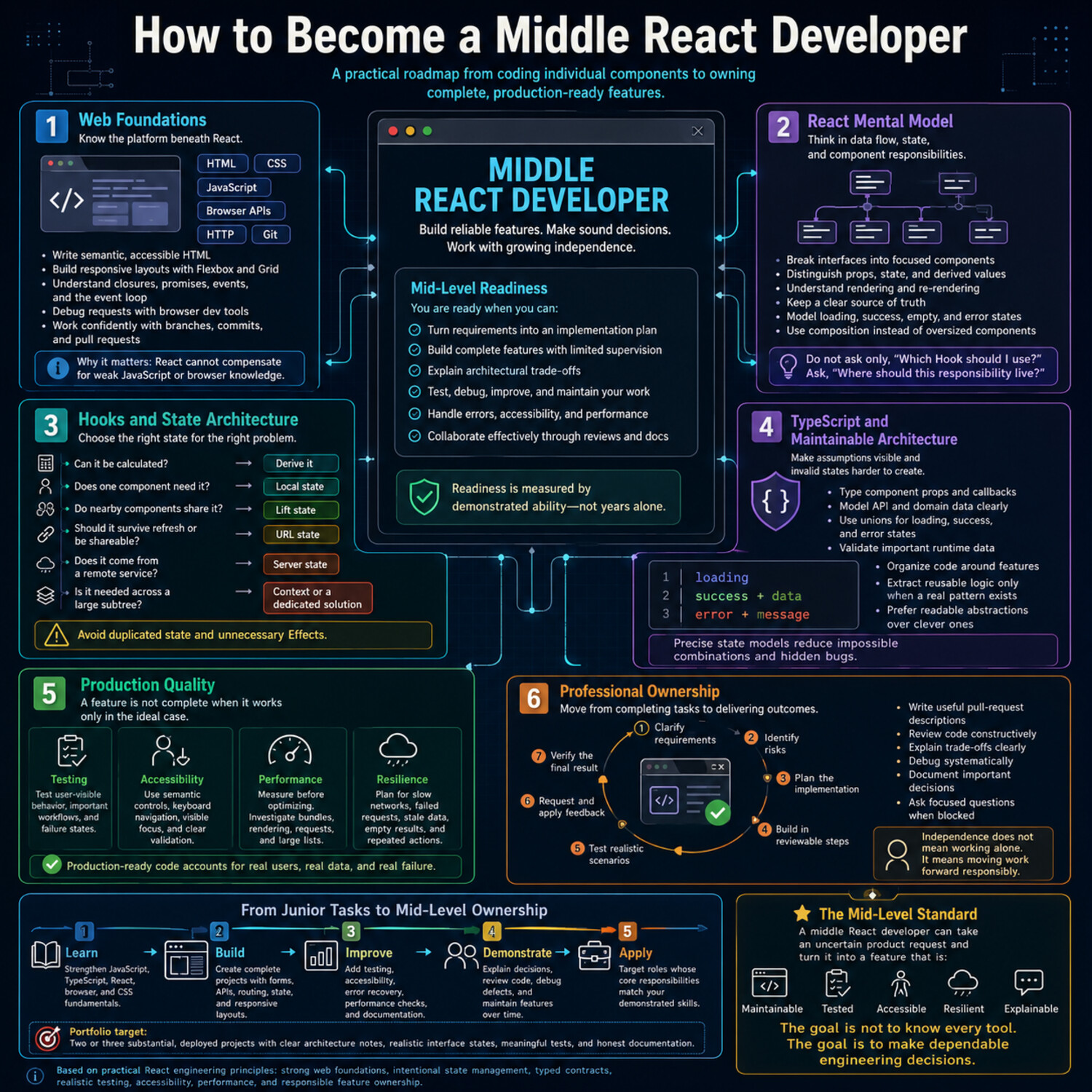
A middle React developer—more commonly called a mid-level React developer in the U.S.—is a front-end engineer who can complete substantial development tasks with limited supervision. This role sits between junior developers, who often need regular guidance, and senior developers, who typically lead architecture decisions, mentor teams, and manage complex technical risks.
Reaching the middle level is not simply a matter of spending a certain number of years with React. Employers may use experience as an initial screening factor, but practical ability is usually more important. A mid-level developer should understand how React works, make reasonable implementation decisions, and deliver reliable features within an existing codebase.
Typical responsibilities include:
- Building and maintaining reusable React components
- Integrating user interfaces with APIs and external services
- Managing local, shared, server, and form state appropriately
- Writing tests for important user flows and application behavior
- Investigating bugs and identifying their underlying causes
- Reviewing pull requests and responding constructively to feedback
- Considering accessibility, performance, security, and maintainability
- Communicating progress, risks, and technical tradeoffs to teammates
The key difference between junior and mid-level work is independence. A junior developer may need help breaking a feature into tasks, choosing an approach, or diagnosing unexpected behavior. A mid-level developer can usually examine the requirements, navigate the codebase, propose a solution, and complete the work while asking focused questions when necessary.
Independence does not mean working without collaboration. Strong developers know when to seek input—especially when a decision affects application architecture, user data, security, or other teams. The goal is not to solve every problem alone, but to move work forward without requiring constant direction.
Job titles also vary significantly between organizations. One company’s junior role may resemble another company’s mid-level position. For that reason, evaluate job descriptions by their actual expectations rather than the title alone. Look for responsibilities such as independently delivering features, contributing to code reviews, improving existing systems, and explaining technical decisions. These are more reliable indicators of a middle React role than years of experience or a specific label.
Assess Your Current Skills and Identify the Gaps
Before planning what to learn next, take an honest inventory of what you can already do. Many developers spend too much time repeating familiar tutorials or collecting new tools without addressing the skills that actually limit their progress. A focused self-assessment helps you build a learning plan based on evidence rather than guesswork.
Evaluate yourself across several core areas:
- JavaScript and TypeScript: Can you work confidently with asynchronous code, array methods, modules, error handling, type narrowing, generics, and common data transformations?
- React: Can you design components, manage different types of state, create custom hooks, handle forms, and explain why a component renders?
- Application development: Can you integrate an API, implement loading and error states, protect authenticated routes, and organize a growing codebase?
- Testing and debugging: Can you write meaningful tests, reproduce a bug, inspect network requests, and trace a problem to its source?
- User experience: Do your interfaces support keyboard navigation, responsive layouts, clear feedback, and accessible form controls?
- Teamwork: Can you review code, explain technical decisions, estimate a task, and raise risks before they become blockers?
Do not rate yourself only on whether you recognize a concept. Use practical evidence. For example, knowing what a custom hook is differs from being able to design one that has a clear purpose, a stable API, and appropriate dependencies. Similarly, completing a guided project does not necessarily prove that you can make the same decisions independently.
A useful assessment method is to choose a realistic feature—such as a searchable product list, an account settings form, or a dashboard connected to an API—and build it without following a step-by-step tutorial. Track where you become uncertain, need extensive documentation, or introduce repeated bugs. Those points reveal more than a broad checklist alone.
Once you identify the gaps, group them by priority:
- Blocking gaps prevent you from completing common React tasks, such as weak JavaScript fundamentals or difficulty working with APIs.
- Professional-practice gaps affect code quality, including limited testing, accessibility, debugging, or Git experience.
- Growth gaps involve advanced topics that are useful but not immediately essential, such as complex performance optimization or specialized state-management patterns.
Turn the highest-priority gaps into specific goals. “Improve TypeScript” is too broad. A stronger goal is: Convert an existing React feature to TypeScript, remove unsafe types, and explain the main type decisions during a code review. Specific goals make progress easier to measure and connect learning directly to the work expected from a mid-level developer.
Revisit your assessment after completing several substantial features. The goal is not to eliminate every weakness before applying for roles. It is to demonstrate that you can deliver reliable work independently, recognize the limits of your knowledge, and close important gaps through deliberate practice.
Build a Strong JavaScript and TypeScript Foundation
React simplifies the process of building user interfaces, but it does not replace the need for solid JavaScript knowledge. Components, hooks, event handlers, state updates, and API requests all depend on the language itself. When a developer struggles to explain unexpected React behavior, the underlying issue is often related to JavaScript concepts such as closures, object references, asynchronous execution, or variable scope.
A mid-level React developer should be comfortable with the following areas:
- Scope and closures: Understand how functions retain access to variables and how this behavior affects callbacks, event handlers, and hooks.
- Objects and arrays: Use methods such as
map,filter,find, andreduceappropriately, and update data without mutating existing state. - Asynchronous programming: Work confidently with promises,
async/await, error handling, and concurrent requests. - Modules: Organize code with imports and exports while avoiding unnecessary dependencies between files.
- Equality and references: Recognize the difference between primitive values and object references, especially when updating React state.
- Modern syntax: Use destructuring, spread syntax, optional chaining, nullish coalescing, and template literals when they improve readability.
Do not limit your learning to syntax. Practice predicting how code will behave before running it. For example, explain which value a callback captures, whether two objects share the same reference, or why an asynchronous result appears in a particular order. This type of reasoning is essential when debugging real applications.
TypeScript adds another layer of reliability by describing the shapes of values before the code runs. It can catch many common mistakes during development, but only when types are designed carefully. Replacing every uncertain value with any may silence errors without improving the safety or clarity of the code.
Focus on TypeScript features that appear frequently in React projects:
- Typing component props, state, events, and API responses
- Using unions to represent a limited set of valid states
- Narrowing types with conditional checks
- Distinguishing optional properties from values that may be
null - Creating reusable types with generics
- Using utility types such as
Pick,Omit,Partial, andRecord - Handling
unknownvalues safely instead of assuming their structure
One practical exercise is to model an asynchronous request as a set of explicit states: idle, loading, successful, and failed. A well-designed union can prevent the application from treating incomplete data as a successful response. This approach also makes rendering logic easier to understand.
Avoid trying to memorize the entire JavaScript or TypeScript language specification. Instead, build features that force you to apply the fundamentals: transform nested API data, validate uncertain values, write reusable functions, and refactor loosely typed components. When you can explain both what the code does and why it behaves that way, React becomes easier to use, test, and debug.
Master React Beyond the Basics
Knowing how to create components and use a few hooks is only the starting point. To work effectively at the mid level, you need to understand how React updates the interface, how data moves through an application, and how to choose patterns that remain clear as features grow.
Begin with component design. A well-designed component has a focused responsibility, a predictable interface, and a name that communicates its purpose. Avoid splitting every small piece of markup into a separate component, but also watch for components that manage unrelated concerns. A large component that fetches data, validates a form, controls a modal, and renders several interface sections may be easier to maintain when those responsibilities are separated.
You should also be able to distinguish between different types of state:
- Local state belongs to a specific component or a small part of the component tree.
- Shared client state is used across multiple features or distant components.
- Server state represents data retrieved from an external source and may require caching, refetching, and synchronization.
- URL state includes filters, search terms, pagination, or selected tabs that should remain available when a page is refreshed or shared.
- Form state includes field values, validation errors, submission status, and user feedback.
Choosing the correct location for state is often more important than choosing a particular library. Keep state as close as practical to the components that use it, and avoid duplicating values that can be calculated from existing props or state. Derived values usually belong in variables or functions rather than separate state updates.
A mid-level developer should also understand React’s rendering behavior. A component may render again when its state changes, when its parent renders, or when a consumed context value changes. Rendering is not automatically a performance problem, but unnecessary work can become noticeable in complex interfaces. Learn to use React Developer Tools and profiling data before adding optimizations.
Hooks require similar care. Effects are intended for synchronizing a component with something outside React, such as a browser API, subscription, timer, or network process. They should not become a default place for ordinary data transformations. When using an effect, consider:
- What external process is being synchronized?
- Which values does the effect depend on?
- Does it require cleanup?
- Could the same result be produced during rendering or in an event handler?
Custom hooks are useful when they package reusable stateful behavior, not simply because a component contains several lines of logic. A good custom hook has a clear purpose, hides unnecessary implementation details, and returns an interface that is easy to use correctly.
Mid-level React work also includes building complete user experiences. Practice implementing:
- Controlled and uncontrolled forms with useful validation
- Loading, empty, success, and error states
- Routing and protected navigation flows
- Reusable component APIs that do not require excessive configuration
- Accessible keyboard interactions and visible focus behavior
- Responsive layouts that work across screen sizes
- Error recovery when requests or components fail
Performance techniques such as memoization, lazy loading, and code splitting are valuable, but they should address an observed problem. Adding useMemo, useCallback, or memoized components everywhere can make code harder to understand without producing a meaningful benefit. Measure first, identify the expensive operation or rendering path, and then apply the smallest appropriate optimization.
The goal is not to use every React feature. It is to make deliberate decisions and explain their tradeoffs. You are approaching the mid level when you can look beyond “Does this component work?” and also ask, “Is the state in the right place? Is the behavior testable? Can another developer understand it? What happens when the request fails or the feature expands?” Those questions lead to React applications that are more dependable and easier to maintain.
Learn Production-Ready Front-End Architecture
A React application can work well as a small project and still become difficult to maintain as features, developers, and business requirements increase. Production-ready architecture is not about creating the most complex folder structure or introducing every popular library. It is about organizing code so that developers can understand, test, change, and extend it without causing unnecessary side effects.
For many applications, a feature-based structure is more practical than grouping every file by type. Instead of placing all components in one folder, all hooks in another, and all API functions elsewhere, related code can be organized around features such as authentication, billing, search, or account settings. Shared interface elements and utilities should remain separate when they are genuinely reusable across features.
A feature might contain:
- Page and feature-specific components
- API request functions and response types
- Custom hooks
- Validation rules
- Tests
- State-management logic
- Constants and helper functions
This approach keeps related code close together and makes feature boundaries easier to recognize. However, avoid turning folder structure into a rigid rule. Architecture should make navigation and ownership clearer, not add layers that developers must work around.
State design is another important architectural decision. Before introducing global state, identify what kind of information you are managing. Data from an API has different requirements from temporary interface state. Search filters may belong in the URL, while a modal’s open state can usually remain local to the component that controls it. Authentication information or user preferences may need to be available across larger parts of the application.
API integration should also account for more than a successful response. A reliable feature needs to handle the full request lifecycle:
- Show an appropriate loading state.
- Prevent accidental duplicate actions when necessary.
- Handle failed requests without leaving the interface unusable.
- Validate or safely interpret external data.
- Provide clear feedback after successful updates.
- Consider cancellation, stale responses, or retries when relevant.
Do not assume that TypeScript types guarantee the structure of data received at runtime. Type definitions help during development, but external responses can still be incomplete or unexpected. Validate important data at system boundaries, especially when the interface depends on a specific response shape.
Authentication flows require similar care. A protected route can improve navigation, but client-side checks alone do not secure private data or restricted actions. The server must enforce authorization. On the front end, your responsibility includes managing session state, handling expired sessions, avoiding the display of sensitive information in inappropriate places, and presenting clear recovery options when access is denied.
Production applications should also fail gracefully. Route-level error handling, error boundaries, and useful fallback interfaces can prevent one broken component from making an entire page unusable. Error messages shown to users should explain what they can do next without exposing internal system details. Meanwhile, development logs and monitoring data should provide enough context for the team to investigate the failure.
As you make architectural decisions, document the reasoning behind choices that are not obvious. A short note explaining why state lives in the URL, why a feature uses a particular caching strategy, or why two similar components remain separate can be more useful than a large amount of abstract documentation. Good architecture is visible not only in the folder tree, but also in how confidently a team can modify the application while understanding the consequences.
Write Reliable, Maintainable Code
A mid-level React developer is expected to do more than make a feature work under ideal conditions. The code should also be understandable, testable, and safe to change. Reliability comes from combining clear design, focused tests, consistent team practices, and a disciplined debugging process.
Testing is most useful when it verifies behavior that matters to users and the business. Different test levels serve different purposes:
- Unit tests check small, isolated functions, such as formatters, validation rules, or data transformations.
- Component and integration tests verify how components, hooks, forms, and API interactions work together.
- End-to-end tests exercise important workflows in an environment that resembles the real application, such as signing in, completing a purchase, or updating account information.
Avoid testing implementation details that users cannot observe. For example, a test usually should not depend on a component’s internal state variable or exact function names. It is more durable to confirm that a user action produces the expected result.
it("shows a validation message when the email is invalid", async () => {
  render(<NewsletterForm />);

  await user.type(screen.getByLabelText(/email/i), "invalid-address");
  await user.click(screen.getByRole("button", { name: /subscribe/i }));

  expect(
    screen.getByText(/enter a valid email address/i)
  ).toBeInTheDocument();
});
This test focuses on visible behavior: the user enters invalid data, submits the form, and receives useful feedback.
Maintainability also depends on everyday engineering habits. Clear names, small functions, predictable component APIs, automated formatting, and consistent linting reduce the amount of mental effort required to understand a codebase. Comments should explain decisions or constraints that are not obvious from the code, rather than restating what each line does.
Code reviews are another important part of reliable development. When reviewing a pull request, look beyond formatting preferences. Consider whether the code:
- Handles loading, error, empty, and success states
- Introduces unnecessary complexity or duplicated logic
- Preserves accessibility and expected user behavior
- Includes appropriate tests
- Creates security or performance concerns
- Is organized so another developer can modify it later
Review comments should be specific and constructive. Explain the risk or reasoning behind a suggestion, and distinguish required changes from optional improvements. When receiving feedback, evaluate the technical concern instead of treating the review as a judgment of your ability.
Mid-level developers also need to work safely in older or unfamiliar codebases. A complete rewrite is rarely the only option. Before refactoring, identify the current behavior, add tests around important paths, and make changes in small steps. Separating data logic from presentation or extracting one focused component is often safer than redesigning an entire feature at once.
When a defect appears, use a structured debugging process:
- Reproduce the issue consistently.
- Reduce it to the smallest failing case.
- Inspect browser errors, network requests, state changes, and component renders.
- Form a specific hypothesis about the cause.
- Test one explanation at a time.
- Add a regression test when practical.
Browser developer tools and React Developer Tools can help identify failed requests, incorrect props, unexpected renders, and state changes. Logs can be useful, but they should capture meaningful context rather than create noise or expose sensitive information.
Reliable code is not code that never changes or never fails. It is code whose behavior is clear, whose important paths are protected by tests, and whose failures can be diagnosed and corrected without unnecessary risk.
Gain Real-World Experience Through Portfolio Projects
A strong portfolio should show that you can solve realistic problems, not just reproduce tutorial steps. For a mid-level React role, two or three substantial projects usually communicate more than a long list of small demos. Each project should demonstrate how you handle requirements, technical decisions, edge cases, testing, and ongoing maintenance.
Choose project ideas that require more than static pages or basic create-read-update-delete operations. Useful examples include a project management dashboard, an appointment booking interface, an inventory system, a learning platform, or a customer support portal. The subject matters less than the depth of the implementation.
A well-developed portfolio project might include:
- Authentication and protected routes
- API integration with loading, empty, error, and success states
- Search, filtering, sorting, and pagination
- Complex forms with validation and clear error messages
- Responsive layouts and keyboard-accessible interactions
- Unit, integration, or end-to-end tests for important workflows
- Role-based interface behavior
- Optimistic updates or cache invalidation where appropriate
- Performance improvements based on actual measurements
- Deployment, environment configuration, and basic monitoring
Avoid adding features only to make the technology list longer. Each tool should solve a recognizable problem. For example, a state-management library may be appropriate when several distant parts of the application need coordinated client state. It may be unnecessary when a few local state variables would keep the feature simpler.
You can make a project more realistic by treating it like a small product rather than a coding exercise. Start with a short requirements document that defines the target user, the main workflow, and the constraints. Break the work into tasks, track known issues, and make changes through focused commits or pull requests. This process provides evidence that you can organize work as well as write code.
Documentation is an important part of the portfolio. A useful project page or README should explain:
- The problem: What user need or workflow does the project address?
- The solution: What are the main features and how do they work?
- The architecture: How are components, data requests, state, and tests organized?
- Key decisions: Why did you choose particular patterns or tools?
- Tradeoffs: What limitations did you accept, and what would you improve next?
- Setup: How can another developer run and evaluate the project?
Include specific technical examples rather than broad claims. Instead of writing, “The application is highly optimized,” explain that you identified an expensive list-rendering path with a profiler and reduced unnecessary work by restructuring state or limiting rendered items. If no performance issue was measured, avoid claiming that an optimization was necessary.
Your portfolio should also show how the project handles failure. Reviewers often learn more from error states, validation, and recovery flows than from the ideal path. Consider what happens when an API request fails, a user submits invalid data, a session expires, or a result set is empty.
Presentation quality matters, but the interface does not need elaborate visual effects. Prioritize readable layouts, consistent spacing, useful feedback, semantic HTML, and predictable interactions. A polished project should work across common screen sizes and should not depend entirely on mouse input.
Not all relevant experience has to come from personal projects. Open-source contributions, freelance assignments, volunteer work, internal tools, and team projects may also demonstrate mid-level skills. Describe your individual contribution accurately, especially when several people worked on the same product. Clarify which features you implemented, which decisions you influenced, and how you collaborated with others.
Do not publish proprietary source code, private data, or confidential details from previous work. You can still describe the challenge, your responsibilities, and the general approach without revealing protected information.
Before adding a project to your portfolio, review it as if another developer had just joined the team. Can they understand the purpose, run the application, navigate the code, and identify the most important decisions? If so, the project is doing more than displaying technical knowledge—it is demonstrating the ownership, judgment, and communication expected from a mid-level React developer.
Prepare for Middle React Developer Interviews
Interview preparation should focus on explaining how you solve problems, not memorizing isolated definitions. Mid-level React interviews often assess whether you can reason through unfamiliar situations, make practical tradeoffs, and communicate clearly while working with incomplete information.
Start by reviewing the technical areas most closely connected to everyday React development:
- JavaScript: closures, asynchronous execution, object references, array methods, modules, and error handling
- TypeScript: unions, generics, narrowing, utility types, and typing component interfaces
- React: rendering behavior, hooks, state placement, forms, context, component composition, and effects
- Browser fundamentals: the event loop, network requests, storage, accessibility, and basic security awareness
- Testing: choosing what to test, writing behavior-focused tests, and distinguishing unit, integration, and end-to-end coverage
- Architecture: organizing features, managing server and client state, handling failures, and keeping code maintainable
Do not prepare only by reading answers. Practice explaining concepts aloud and applying them to realistic examples. For instance, instead of defining useEffect, describe when you would use it, when you would avoid it, how dependencies affect its behavior, and what cleanup may be required. Interviewers often learn more from your reasoning than from a perfectly phrased definition.
Coding exercises may involve transforming data, fixing a bug, building a small component, or extending an existing feature. Before writing code, clarify the requirements and identify important edge cases. Then explain your approach in a logical sequence:
- Restate the problem in your own words.
- Identify the expected inputs, outputs, and constraints.
- Choose a straightforward solution before optimizing.
- Test the normal path and several failure or boundary cases.
- Discuss what you would improve with more time.
For React exercises, remember to consider more than the successful interaction. A complete solution may need loading feedback, validation, empty states, error handling, accessible labels, and clear state ownership. You may not have time to implement every improvement, but recognizing them demonstrates practical judgment.
Take-home assignments require careful scope control. Read the instructions closely, meet the core requirements first, and avoid adding unnecessary tools or architectural layers. Include a concise README that explains how to run the project, what decisions you made, which tradeoffs you accepted, and what you would address next. Review the final submission for broken setup steps, unused code, missing states, and unclear naming.
Behavioral questions are also important because mid-level developers work through people as well as code. Prepare examples of situations in which you:
- Diagnosed a difficult defect
- Received or gave constructive code-review feedback
- Disagreed with a technical approach and helped reach a decision
- Misjudged the complexity of a task and communicated the risk
- Improved an existing feature without rewriting everything
- Took responsibility for a mistake and prevented it from recurring
Use specific examples with a clear structure: the situation, your responsibility, the actions you took, and the result. Be honest about what you personally contributed. A strong answer can include uncertainty, an unsuccessful first attempt, or a lesson learned, provided you explain how you responded.
You should also evaluate the employer during the interview. Ask how the team reviews code, handles testing, makes technical decisions, supports onboarding, and measures successful performance in the role. These questions help clarify whether the actual responsibilities match the job title.
Before applying, use a simple readiness check. You should be able to build and explain a complete feature, debug common problems, discuss testing choices, review code constructively, and describe architectural tradeoffs. You do not need a perfect answer to every question. A credible mid-level candidate shows sound fundamentals, independent problem-solving, honest communication, and the ability to learn from feedback.
Conclusion
Becoming a mid-level React developer is less about mastering every library and more about building reliable features with increasing independence. Strong JavaScript and TypeScript fundamentals, thoughtful React patterns, practical testing skills, and sound architectural judgment form the foundation of that progress.
Use real projects to turn knowledge into evidence. Build complete workflows, handle failure states, document your decisions, and practice explaining the tradeoffs behind your solutions. Regularly review your skill gaps and focus on the areas that most affect your ability to deliver maintainable work.
You do not need to know everything before pursuing a mid-level role. You should, however, be able to solve common problems methodically, recognize when you need input, communicate clearly, and improve through feedback. Consistent practice in these areas will prepare you for both the responsibilities and the interviews associated with mid-level React development.