
Becoming a junior Python developer is not about memorizing every Python feature or collecting as many certificates as possible. It is about building enough practical skill to solve real problems, understand existing code, communicate clearly, and keep improving through feedback.
Python is often recommended to beginners because its syntax is readable, its ecosystem is broad, and it can be used in many areas: backend development, automation, data processing, testing, scripting, APIs, and internal business tools. But being employable as a junior developer requires more than knowing the language. You also need development workflow skills, debugging habits, testing awareness, version control, database basics, and enough project experience to show that you can turn an idea into working software.
The U.S. Bureau of Labor Statistics describes software development as collaborative work that includes designing, building, testing, documenting, maintaining, and improving software. It also projects strong employment growth for software developers, quality assurance analysts, and testers from 2024 to 2034, but that does not mean every beginner will get hired quickly or automatically. The practical path is to build demonstrable competence, not rely on market optimism.
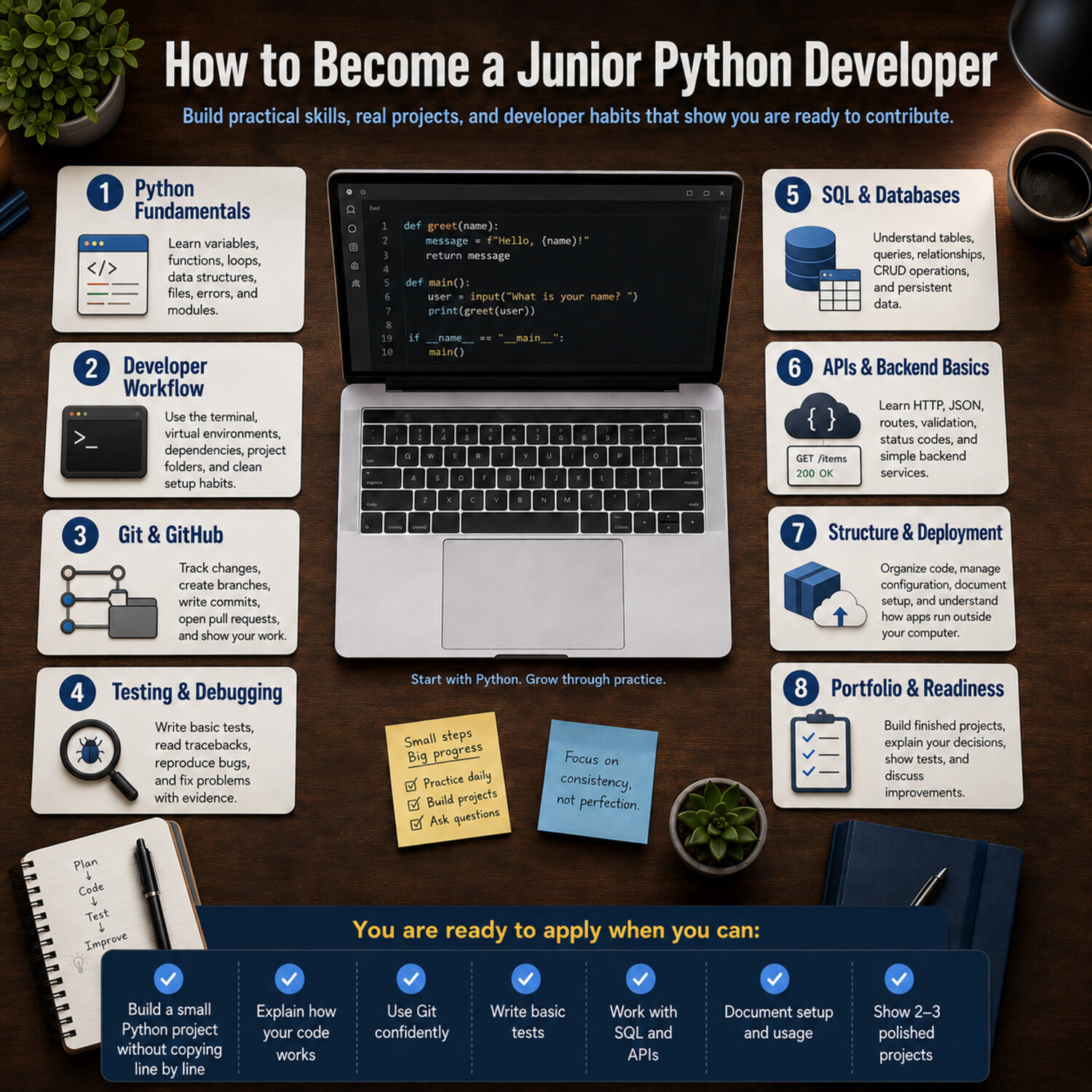
What Does a Junior Python Developer Actually Do?
A junior Python developer usually works under the guidance of more experienced developers. The role is not to architect an entire system alone. The role is to contribute safely, learn quickly, and gradually take ownership of small pieces of software.
A junior Python developer may:
- Fix bugs in existing Python code
- Build small features
- Write scripts to automate repetitive tasks
- Add or update API endpoints
- Write basic tests
- Update documentation
- Work with databases
- Review error logs
- Use Git branches and pull requests
- Ask questions during code review
- Improve older code without breaking it
The most important point: junior does not mean helpless. A junior developer is expected to need support, but they should also be able to investigate problems, read documentation, explain what they tried, and make steady progress.
For example, a junior developer might receive a task like this:
“Add a field called
statusto the task API, store it in the database, and return it in the API response.”
That task requires more than Python syntax. It requires understanding data models, database changes, API responses, testing, Git workflow, and communication. This is why a strong learning plan should include the full development workflow, not only Python fundamentals.
Core Python Skills You Need First
Python fundamentals are the foundation. Without them, every framework, database library, and deployment tool will feel confusing.
Start with the core language:
- Variables
- Data types
- Strings
- Numbers
- Booleans
- Lists
- Dictionaries
- Sets
- Tuples
- Loops
- Conditionals
- Functions
- Modules
- File handling
- Error handling
- Basic object-oriented programming
These topics matter because they appear everywhere. A backend API, a command-line tool, a test suite, and a data-cleaning script all depend on the same fundamentals.
For example, a dictionary is not just a beginner topic. It is central to working with JSON, API responses, configuration files, and structured data:
user = {
    "id": 101,
    "name": "Alex",
    "is_active": True
}

if user["is_active"]:
    print(f"Welcome back, {user['name']}!")
A beginner may see this as a small example. A developer sees the same pattern inside web applications, authentication logic, database records, and API payloads.
You should also learn Python’s standard library early. The standard library includes modules for files, dates, math, JSON, paths, logging, command-line arguments, and more. Python’s official documentation describes the standard library as extensive and designed to provide standardized solutions for many everyday programming problems.
Useful standard library modules for beginners include:
pathlibfor file pathsjsonfor JSON datadatetimefor dates and timescsvfor CSV filesloggingfor application logsargparsefor command-line toolsunittestfor built-in testingsqlite3for lightweight database practice
A strong junior developer does not immediately install a package for every problem. They first ask: Can Python already do this?
How to Build Real Python Expertise
Knowing syntax is the first step. Expertise comes from using that syntax to solve increasingly realistic problems.
A practical learning sequence looks like this:
- Read small examples.
- Modify them.
- Rebuild them without looking.
- Break them intentionally.
- Debug the error.
- Refactor the code.
- Add tests.
- Document what the code does.
For example, do not only build a calculator once. Build a calculator, then add input validation, then turn it into a command-line app, then write tests, then restructure it into functions, then document how to run it.
That process teaches deeper skills:
- How to organize logic
- How to handle invalid input
- How to avoid repeated code
- How to read error messages
- How to make code usable by someone else
A junior developer becomes more valuable when they can explain not just what the code does, but why it is structured that way.
Development Environment and Workflow
To work like a developer, you need a reliable local development setup.
At minimum, learn how to:
- Install Python
- Use a code editor such as VS Code or PyCharm
- Run Python files from the terminal
- Create project folders
- Create virtual environments
- Install dependencies
- Freeze or document dependencies
- Use environment variables
- Keep secrets out of code
- Run tests locally
A virtual environment is especially important. Python’s venv module creates isolated environments with their own installed packages. This prevents one project’s dependencies from interfering with another project’s dependencies. The official Python documentation notes that virtual environments are commonly stored in a project directory, are not checked into source control, and can be recreated when needed.
A typical beginner project might look like this:
task-tracker/
├── .venv/
├── app/
│   ├── __init__.py
│   ├── models.py
│   └── main.py
├── tests/
│   └── test_tasks.py
├── .gitignore
├── README.md
└── requirements.txt
This structure shows that you understand more than writing one file. You understand separation, repeatability, and project hygiene.
A practical workflow might be:
python -m venv .venv
source .venv/bin/activate
pip install pytest
python app/main.py
pytest
On Windows, activation commands differ, but the concept is the same: isolate the project, install only what it needs, and make the setup reproducible.
Git and GitHub Skills
Git is not optional for modern software work. It is how developers track changes, collaborate, review code, and recover from mistakes. GitHub’s documentation describes version control as a system that tracks the history of changes as people and teams collaborate on projects.
A junior Python developer should understand:
- Repositories
- Commits
- Branches
- Pull requests
- Merge conflicts
.gitignore- Commit messages
- Code review comments
- Project history
At the beginner level, Git is often treated as a place to “upload code.” That is too limited. Git is a thinking tool. It helps you separate work into meaningful steps.
Weak commit message:
update
Stronger commit message:
Add input validation for task creation
A good commit message helps reviewers understand what changed and why.
You should also practice pull requests. GitHub describes pull requests as a way to propose, review, and merge code changes. Even if you are working alone, you can create a branch, open a pull request, review your own changes, and merge it. This builds the habit of looking at your work before treating it as finished.
A strong beginner GitHub project should include:
- A clear README
- Installation steps
- Usage examples
- Tests
- Meaningful commits
- No secrets or private credentials
- A clean folder structure
- Notes about limitations or future improvements
Employers and collaborators do not only look at whether the project works. They also look at whether the project is understandable.
Testing and Debugging Skills
Testing is one of the clearest differences between someone who writes scripts casually and someone who is preparing for professional development work.
Tests help answer a basic question:
“Does this code still work after I changed it?”
A junior developer does not need to know every testing pattern, but they should understand:
- Unit tests
- Test cases
- Edge cases
- Assertions
- Test files
- Test naming
- Regression testing
- Debugging tracebacks
The pytest framework is popular because it makes small tests readable and can scale to more complex application testing. Its documentation emphasizes simple, readable tests and shows how plain assert statements can be used for test checks.
Example:
def calculate_discount(price, percentage):
    if price < 0:
        raise ValueError("Price cannot be negative")
    return price - (price * percentage / 100)


def test_calculate_discount():
    assert calculate_discount(100, 20) == 80


def test_negative_price_raises_error():
    import pytest

    with pytest.raises(ValueError):
        calculate_discount(-50, 10)
This small example demonstrates several professional habits:
- The function has a clear purpose.
- Invalid input is handled.
- Expected behavior is documented through tests.
- Future changes can be checked automatically.
Debugging is equally important. Beginners often panic when they see errors. Developers learn to read errors patiently.
When debugging, ask:
- What did I expect to happen?
- What actually happened?
- What line caused the error?
- What data was being used?
- Did I recently change something related?
- Can I reproduce the problem?
- Can I write a test that captures the problem?
A traceback is not an insult from the computer. It is a map.
Databases and SQL Basics
Many Python applications store and retrieve data. That means junior developers should understand database basics even if they are not applying for database administrator roles.
Start with relational database concepts:
- Tables
- Rows
- Columns
- Primary keys
- Foreign keys
- Relationships
- Queries
- Indexes at a basic level
- Transactions at a basic level
Then learn basic SQL:
SELECT * FROM users;

SELECT name, email
FROM users
WHERE is_active = true;

INSERT INTO tasks (title, status)
VALUES ('Write tests', 'open');

UPDATE tasks
SET status = 'done'
WHERE id = 1;

DELETE FROM tasks
WHERE id = 2;
SQL matters because backend applications often need to create, read, update, and delete data. These operations are commonly called CRUD operations.
PostgreSQL’s official tutorial introduces relational database concepts and the SQL language, including creating tables, querying data, joins, updates, deletions, views, foreign keys, and transactions.
A good beginner path is:
- Use SQLite for local practice.
- Learn basic SQL queries.
- Build a small Python app that stores data.
- Move to PostgreSQL for a more production-like database.
- Learn how environment variables store database connection settings.
- Learn basic migration concepts.
For a portfolio project, a task tracker with a database is more valuable than another calculator because it shows you can work with persistent data.
Example project features:
- Add a task
- Mark a task complete
- Edit a task
- Delete a task
- Filter tasks by status
- Save tasks in a database
- Add tests for task creation and filtering
This teaches Python, SQL, application logic, and testing together.
Web Development and APIs
Many junior Python roles involve backend development. That means you should understand how web applications and APIs work.
Start with these concepts:
- HTTP
- Request
- Response
- Status code
- JSON
- Endpoint
- Route
- Query parameter
- Request body
- Authentication
- Validation
- Middleware
- Client-server model
An API lets software communicate with other software. For example, a frontend app might send a request to a Python backend:
POST /tasks
Content-Type: application/json

{
  "title": "Write README",
  "status": "open"
}
The backend might respond:
{
  "id": 12,
  "title": "Write README",
  "status": "open"
}
FastAPI is a useful framework for learning modern Python API development because its official tutorial is structured step by step and covers practical API needs progressively.
A simple FastAPI example:
from fastapi import FastAPI

app = FastAPI()

tasks = []


@app.get("/tasks")
def get_tasks():
    return tasks


@app.post("/tasks")
def create_task(title: str):
    task = {"id": len(tasks) + 1, "title": title, "status": "open"}
    tasks.append(task)
    return task
This is not production-ready, but it introduces key ideas: routes, request handling, response data, and application state.
To grow beyond the basics, add:
- Pydantic models for validation
- A database instead of an in-memory list
- Error handling
- Tests for endpoints
- Pagination
- Logging
- Environment-based configuration
You do not need to master Django, Flask, and FastAPI all at once. Choose one framework, build something real, and understand the underlying concepts. Frameworks change; HTTP, data modeling, testing, and debugging remain valuable.
Packaging, Dependencies, and Project Structure
A beginner often writes code that only works on their own machine. A junior developer should learn how to make projects easier for others to install, run, test, and maintain.
This includes:
- Naming files clearly
- Separating source code from tests
- Managing dependencies
- Writing a README
- Avoiding hard-coded paths
- Avoiding hard-coded secrets
- Using configuration files
- Understanding
requirements.txtandpyproject.toml
The Python Packaging User Guide explains that packaging decisions should consider the project’s users and the environment where the project will run. It also notes that packaging is closely tied to deployment experience.
A simple beginner project can use requirements.txt:
fastapi
uvicorn
pytest
A more modern Python project may use pyproject.toml, especially when building reusable packages or using newer dependency tools.
A strong project structure communicates professionalism:
weather-api/
├── app/
│   ├── __init__.py
│   ├── main.py
│   ├── config.py
│   ├── services.py
│   └── schemas.py
├── tests/
│   ├── test_api.py
│   └── test_services.py
├── .env.example
├── .gitignore
├── README.md
├── pyproject.toml
└── requirements.txt
Notice the .env.example file. It shows what environment variables are needed without exposing real secrets.
For example:
DATABASE_URL=postgresql://user:password@localhost:5432/weather
API_KEY=replace-with-your-own-key
Never commit real API keys, passwords, or private tokens to a public repository.
Containers and Deployment Basics
A junior Python developer does not need to be a DevOps expert, but they should understand what deployment means.
Deployment means making software run somewhere other than your local development environment. That could be a cloud server, internal company platform, container environment, or managed hosting service.
Learn these concepts:
- Local environment vs. production environment
- Environment variables
- Logs
- Build process
- Runtime
- Ports
- Containers
- Dockerfile
- Docker Compose
- Database service
- Deployment errors
Docker is commonly used to create consistent development and runtime environments. Docker’s documentation shows how containers can provide a development environment where multiple services, such as a backend, frontend, database, and proxy, run together without requiring each service to be installed directly on the developer’s machine.
For a junior developer, the practical value of containers is simple:
“Can another developer run my project without spending hours fixing setup problems?”
A beginner-friendly Docker goal is not to master orchestration. It is to containerize a small API and run it with a database locally.
For example:
docker compose up
That command might start:
- A Python API
- A PostgreSQL database
- A test database
- Local development services
This teaches environment consistency, service configuration, and real-world application setup.
High-Value Portfolio Projects
A portfolio should prove practical ability. It should not be a collection of copied tutorials.
Strong portfolio projects are:
- Small enough to finish
- Useful enough to explain
- Documented clearly
- Tested at least partly
- Structured cleanly
- Built with realistic tools
- Honest about limitations
Project 1: Command-Line Task Manager
Skills demonstrated:
- Python fundamentals
- File handling
- Functions
- Error handling
- Basic testing
- Command-line interaction
Features:
- Add tasks
- List tasks
- Mark tasks complete
- Save tasks to a JSON file
- Validate empty task names
- Add tests for task operations
Why it works: it shows you can build a complete tool without hiding behind a framework.
Project 2: FastAPI CRUD App
Skills demonstrated:
- API development
- HTTP methods
- JSON
- Data validation
- Database integration
- Testing endpoints
Features:
- Create, read, update, and delete records
- Store data in PostgreSQL
- Validate request data
- Return useful error messages
- Add automated tests
- Include API usage examples in the README
Why it works: it resembles real backend work.
Project 3: Job Application Tracker
Skills demonstrated:
- Data modeling
- Forms or API design
- Filtering
- Status tracking
- Database relationships
- Practical product thinking
Features:
- Add companies
- Add applications
- Track statuses
- Add notes
- Filter by date or status
- Export to CSV
Why it works: it solves a real problem and gives you something meaningful to discuss in interviews.
Project 4: Automated File Organizer
Skills demonstrated:
- File system operations
pathlib- Error handling
- Logging
- Configuration
- Testing with temporary files
Features:
- Sort files by extension
- Create folders automatically
- Avoid overwriting files
- Log actions
- Provide a dry-run mode
Why it works: it shows automation skills, a common use case for Python.
Project 5: Public API Data App
Skills demonstrated:
- HTTP requests
- JSON parsing
- Error handling
- Caching at a basic level
- API documentation reading
Features:
- Fetch data from a public API
- Handle failed requests
- Display filtered results
- Store recent results
- Add tests with mocked responses
Why it works: it shows that you can work with external systems, not only local code.
What to Put on GitHub
GitHub is often your first proof of work. A project does not need to be huge, but it should be understandable.
A good README should include:
- What the project does
- Why you built it
- Main features
- Technologies used
- Setup instructions
- How to run the project
- How to run tests
- Example usage
- Screenshots or API examples
- Known limitations
- Future improvements
Example README section:
## Why I Built This

I built this task tracker to practice Python API development, database modeling, and automated testing. The project supports basic CRUD operations and uses PostgreSQL for persistent storage.
This is better than simply writing:
A Python project.
You should also include honest limitations:
## Limitations

Authentication is not included yet. The current version is intended for local development and portfolio demonstration.
Honesty builds trust. Pretending a beginner project is production-grade does not.
How to Practice Like a Real Developer
The best practice is not passive. Watching tutorials helps you start, but building, breaking, fixing, and explaining code is what develops skill.
Practice in cycles:
- Choose a small feature.
- Write down the expected behavior.
- Build the simplest version.
- Test it manually.
- Add automated tests.
- Refactor the code.
- Commit your changes.
- Update the README.
For example, instead of saying, “I’m learning APIs,” define a specific task:
“I will add a
GET /tasks/{id}endpoint that returns a task if it exists and returns a 404 error if it does not.”
That one task teaches routing, parameters, lookup logic, error handling, and testing.
You should also practice reading code. Many beginners only write new code, but professional developers spend a lot of time reading existing code. Open one of your older projects and ask:
- What is unclear?
- Which function is too long?
- Where is logic repeated?
- Are names specific?
- Are errors handled?
- Would another person know how to run this?
This habit prepares you for real codebases.
Common Mistakes Beginners Should Avoid
Mistake 1: Staying in Tutorial Mode Too Long
Tutorials are useful, but they can create false confidence. After completing a tutorial, rebuild the project with changes.
For example:
- Change the database model.
- Add a new endpoint.
- Write missing tests.
- Improve validation.
- Replace in-memory storage with a database.
You know you are learning when you can make changes without step-by-step instructions.
Mistake 2: Learning Too Many Tools at Once
Python, Django, Flask, FastAPI, PostgreSQL, Docker, AWS, Kubernetes, React, and data science libraries are too much at the same time.
A better sequence:
- Python fundamentals
- Git and terminal basics
- Testing
- SQL
- One web framework
- One database
- Basic deployment or containers
Depth beats tool collecting.
Mistake 3: Avoiding Tests
Beginners often skip tests because tests feel slower. In reality, tests help you move faster later because they catch mistakes.
Even two or three tests are better than none.
Mistake 4: Copying Portfolio Projects Without Understanding Them
A copied project can hurt you if you cannot explain it. You should be able to answer:
- Why did you choose this structure?
- How does data move through the app?
- What happens when input is invalid?
- What would you improve next?
- What was the hardest bug?
Mistake 5: Ignoring Communication Skills
Junior developers are judged not only by code but also by how they communicate.
Practice saying:
- “Here is what I tried.”
- “Here is where I am stuck.”
- “Here is the error message.”
- “Here is my current understanding.”
- “Here are two possible approaches.”
Clear communication reduces confusion and makes you easier to mentor.
A Practical Learning Roadmap
Do not measure readiness only by months. Measure it by what you can do.
Stage 1: Python Fundamentals
You are ready to move forward when you can:
- Write functions
- Use lists and dictionaries
- Read and write files
- Handle errors
- Split code into modules
- Explain your code clearly
Practice project: command-line task manager.
Stage 2: Developer Workflow
You are ready to move forward when you can:
- Use the terminal
- Create a virtual environment
- Install dependencies
- Use Git branches
- Make meaningful commits
- Push code to GitHub
- Write a clear README
Practice project: improve your task manager and publish it properly.
Stage 3: Testing and Debugging
You are ready to move forward when you can:
- Read tracebacks
- Write basic
pytesttests - Test expected behavior
- Test invalid input
- Reproduce bugs
- Fix bugs without rewriting everything
Practice project: add tests to older projects.
Stage 4: SQL and Databases
You are ready to move forward when you can:
- Create tables
- Insert data
- Query data
- Update records
- Delete records
- Understand primary keys
- Connect Python to a database
Practice project: job application tracker with persistent storage.
Stage 5: APIs and Backend Basics
You are ready to move forward when you can:
- Explain HTTP methods
- Build simple API routes
- Return JSON
- Validate input
- Handle missing records
- Connect an API to a database
- Test endpoints
Practice project: FastAPI CRUD app.
Stage 6: Portfolio Polish
You are ready to apply when you can:
- Show two or three complete projects
- Explain your technical decisions
- Demonstrate tests
- Use Git confidently
- Discuss trade-offs
- Read documentation independently
- Improve a project after feedback
Junior Python Developer Interview Preparation
Interview preparation should be practical. Do not only memorize questions. Practice explaining your reasoning.
Common areas include:
- Python fundamentals
- Data structures
- Functions
- Error handling
- Object-oriented programming basics
- SQL queries
- Git workflow
- API concepts
- Debugging
- Testing
- Project discussion
You might be asked:
“What is the difference between a list and a dictionary?”
A weak answer:
“A list has items and a dictionary has keys.”
A stronger answer:
“A list stores ordered values and is useful when position or sequence matters. A dictionary stores key-value pairs and is useful when I need to look up values by a meaningful key, such as finding a user by ID.”
You might be asked:
“Tell me about a bug you fixed.”
A strong answer includes:
- What the bug was
- How you reproduced it
- What caused it
- How you fixed it
- How you tested the fix
- What you learned
Example:
“In my task tracker, completed tasks were still showing in the open-task filter. I reproduced it by creating three tasks, marking one complete, and calling the filter function. The issue was that I compared the status to
completeinstead ofcompleted. I fixed the condition and added a test so the same mistake would be caught in the future.”
That answer shows debugging, testing, and reflection.
How to Know You Are Ready to Apply
You do not need to be perfect before applying. You do need evidence that you can contribute and learn.
A practical readiness checklist:
- You can build a small Python project without copying every line from a tutorial.
- You can explain your project structure.
- You can use Git branches and commits.
- You can write a clear README.
- You can create and use a virtual environment.
- You can install and document dependencies.
- You can write basic tests.
- You can debug common errors.
- You can use SQL for basic CRUD operations.
- You can build or consume a simple API.
- You can explain at least two portfolio projects.
- You can describe what you would improve next.
- You can read official documentation when stuck.
A useful standard is this:
You are ready to apply when your projects can survive questions.
If someone asks how your app stores data, how errors are handled, how to run tests, or why you chose a certain structure, you should be able to answer honestly.
Frequently Asked Questions
Do I need a computer science degree to become a junior Python developer?
Some employers prefer or require degrees, and BLS notes that software developers, QA analysts, and testers typically need a bachelor’s degree in computer and information technology or a related field. However, hiring requirements vary by employer and role. A strong portfolio, practical projects, internships, open-source contributions, or relevant work experience can also help demonstrate ability.
How much Python do I need to know before applying?
You should know enough to build and explain small applications. That includes functions, data structures, modules, file handling, error handling, testing basics, and reading documentation. You do not need to know every advanced feature.
Should I learn Django, Flask, or FastAPI first?
Choose one based on your goal. FastAPI is a strong choice for learning APIs. Django is useful for full-featured web applications with built-in tools. Flask is lightweight and flexible. The deeper goal is to understand routing, requests, responses, validation, data storage, and testing.
Do junior Python developers need SQL?
Yes, SQL is highly useful. Many applications depend on databases, and even junior developers are often expected to understand basic queries, tables, and relationships.
Is testing important for beginners?
Yes. Testing helps you prove that your code works and protects you when you change it. Basic tests also make your portfolio stronger because they show professional habits.
What projects should I build for my portfolio?
Build projects that demonstrate practical skills. Good options include a task manager, CRUD API, job application tracker, file organizer, public API app, or small automation tool. A finished, documented, tested project is better than a large unfinished one.
Can I use AI tools while learning Python?
Yes, but do not use them as a substitute for understanding. Ask AI tools to explain errors, suggest tests, or review code, but always read the output carefully. You should be able to explain every important line in your project.
How do I avoid tutorial hell?
After every tutorial, change the project. Add a feature, remove a feature, write tests, improve the README, or rebuild it without looking. Learning becomes real when you make independent decisions.
What is the difference between a Python developer and a backend developer?
A Python developer uses Python to build software. A backend developer focuses on server-side systems, APIs, databases, authentication, business logic, and application infrastructure. Many Python developers work as backend developers, but Python can also be used in automation, data work, testing, scripting, and tooling.
Conclusion: The Real Path to Junior-Level Readiness
Becoming a junior Python developer is a process of building practical judgment. Python syntax matters, but it is only one part of the role. You also need to know how to structure projects, use Git, write tests, work with databases, build APIs, read documentation, and communicate clearly.
The strongest beginners are not the ones who claim to know everything. They are the ones who can show finished work, explain their decisions, accept feedback, and keep improving.
A practical path looks like this:
- Learn Python fundamentals.
- Build small projects.
- Use Git from the beginning.
- Write tests.
- Learn SQL.
- Build APIs.
- Document your work.
- Polish your portfolio.
- Practice explaining your code.
- Apply when you can show evidence of skill.
Junior-level readiness is not perfection. It is the ability to contribute carefully, learn consistently, and turn feedback into better code.